
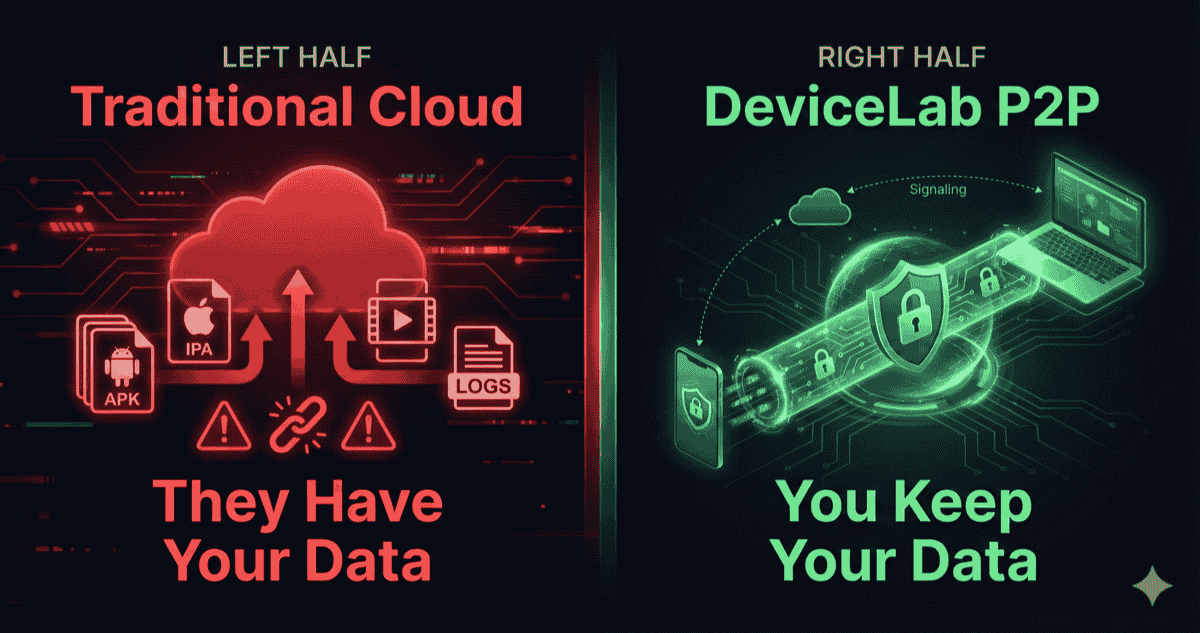
In November 2014, BrowserStack was breached through an unpatched prototype server. The attacker exploited the Shellshock vulnerability to create an IAM user, access production backups, and exfiltrate customer email addresses and hashed passwords. They then used the stolen SES credentials to email 5,000 users claiming BrowserStack was shutting down.
In January 2025, security researchers discovered exposed AWS credentials in BrowserStack’s logging infrastructure, potentially exposing private test logs and customer data in S3 buckets.
The common thread? Both breaches exploited a fundamental architectural weakness: customer data existed on BrowserStack’s servers in the first place.
We built DeviceLab with a different philosophy: the safest data is data that never leaves your infrastructure.
The NIST 800-207 Standard
NIST Special Publication 800-207 defines Zero Trust Architecture as a security model with one core assumption: “Never trust, always verify.”
The document (published August 2020) outlines seven tenets. Three are directly relevant to mobile testing:
Tenet 1: All data sources and computing services are considered resources.
Tenet 2: All communication is secured regardless of network location.
Tenet 4: Access to resources is determined by dynamic policy.
Traditional cloud device farms violate all three. They grant implicit trust to their internal network (your binary sits on their storage). Communication security ends at their perimeter (they can access your data internally). Access is static (once uploaded, your binary is theirs until they delete it).
DeviceLab implements Zero Trust differently: we removed ourselves from the data path entirely.
Two Architectures: Upload vs. P2P
The Traditional Upload Model
Every cloud device farm—BrowserStack, Sauce Labs, LambdaTest, Perfecto—uses the same fundamental architecture:
┌─────────────────────────────────────────────────────────────┐
│                    VENDOR INFRASTRUCTURE                     │
│                                                             │
│  ┌─────────────┐    ┌─────────────┐    ┌─────────────┐     │
│  │   Storage   │    │   Device    │    │    Logs     │     │
│  │   Bucket    │───►│   Farm      │───►│   Database  │     │
│  │  (Your APK) │    │             │    │ (Your Data) │     │
│  └─────────────┘    └─────────────┘    └─────────────┘     │
│        ▲                                      │             │
│        │                                      ▼             │
└────────┼──────────────────────────────────────┼─────────────┘
         │                                      │
    [UPLOAD]                              [DOWNLOAD]
         │                                      │
┌────────┴──────────────────────────────────────┴─────────────┐
│                   YOUR INFRASTRUCTURE                        │
│  ┌─────────────┐                         ┌─────────────┐    │
│  │   CI/CD     │                         │   Browser   │    │
│  │   Runner    │                         │   (View)    │    │
│  └─────────────┘                         └─────────────┘    │
└─────────────────────────────────────────────────────────────┘

Risk Points:
🚨 Storage bucket (binary at rest)
🚨 Device farm (binary installed)
🚨 Logs database (credentials, test data)
🚨 Video storage (screen recordings)
🚨 Internal network (admin access)

Trust Required: COMPLETE
Your binary, test videos, execution logs, and credentials all reside on infrastructure you don’t own, managed by people you’ve never met.
The DeviceLab P2P Model
DeviceLab separates two concerns that cloud providers conflate:
Signaling Plane: Connection establishment (handled by DeviceLab)
Data Plane: Actual test data (never touches DeviceLab)
┌─────────────────────────────────────────────────────────────┐
│                YOUR INFRASTRUCTURE                           │
│                                                             │
│  ┌─────────────┐         P2P          ┌─────────────┐      │
│  │   CI/CD     │◄═══════════════════►│ Device Node │      │
│  │   Runner    │   DTLS Encrypted     │  (Mac Mini) │      │
│  │ (Has Binary)│      Tunnel          │ (Has Phone) │      │
│  └──────┬──────┘                      └──────┬──────┘      │
│         │                                    │              │
│         │        ┌─────────────┐            │              │
│         └───────►│   Browser   │◄───────────┘              │
│                  │ (View Only) │   WebRTC Video            │
│                  └─────────────┘                           │
└─────────────────────────────────────────────────────────────┘
                          ▲
                          │ Signaling Only
                          │ (No Data Payload)
                          ▼
┌─────────────────────────────────────────────────────────────┐
│                DEVICELAB INFRASTRUCTURE                      │
│                                                             │
│  ┌─────────────┐                                           │
│  │ Signaling   │  "User A wants to connect to Device B"    │
│  │ Server      │  No binaries. No videos. No logs.         │
│  └─────────────┘                                           │
│                                                             │
└─────────────────────────────────────────────────────────────┘

Risk Points: NONE on DeviceLab infrastructure

Trust Required: ZERO
We function like a telephone switchboard: we connect caller A to recipient B, then hang up. We never record the conversation because we’re not in the room.
The Encryption Stack
“Peer-to-peer” sounds good, but the security comes from the cryptographic implementation. Here’s exactly what happens when you connect to a device through DeviceLab:
Layer 1: DTLS Handshake (RFC 6347)
Before any data flows, both endpoints perform a DTLS (Datagram Transport Layer Security) handshake. DTLS is the UDP equivalent of TLS—the same encryption that protects your banking transactions.
Per RFC 8827 (WebRTC Security Architecture), all implementations MUST support:
- Cipher Suite:
TLS_ECDHE_ECDSA_WITH_AES_128_GCM_SHA256 - Curve: P-256 (NIST standard elliptic curve)
- Key Exchange: ECDHE (Ephemeral Elliptic Curve Diffie-Hellman)
The “ephemeral” part is critical: every session generates new keys. Even if an attacker recorded encrypted traffic and later compromised long-term keys, they couldn’t decrypt past sessions. This is called Perfect Forward Secrecy.
Layer 2: SRTP for Video (RFC 3711)
The device screen stream uses SRTP (Secure Real-time Transport Protocol). WebRTC’s specification is explicit:
“Media traffic MUST NOT be sent over plain (unencrypted) RTP or RTCP; that is, implementations MUST NOT negotiate cipher suites with NULL encryption modes.”
Translation: unencrypted video is literally impossible in WebRTC. The protocol rejects it.
Layer 3: Data Channel Encryption
File transfers, ADB commands, and Maestro YAML flows use SCTP over DTLS. Same encryption, different payload type.
What About TURN Relays?
When direct P2P connection fails (strict corporate firewalls with Symmetric NAT), traffic routes through a TURN relay server. Does this compromise security?
No. TURN relays encrypted packets blindly. The relay sees:
- Source IP
- Destination IP
- Encrypted payload (gibberish)
It cannot decrypt the stream because the encryption keys were negotiated directly between endpoints during the DTLS handshake—the TURN server was never part of that exchange.
As one WebRTC security expert notes: “WebRTC encrypts all media regardless of TURN, STUN or anything else. Using TURN/TLS adds nothing to the security of the session because SRTP encryption happens before the packets reach TURN.”
What We Actually Store
Complete transparency: here’s everything DeviceLab’s infrastructure contains:
We Store:
- User accounts: Email, hashed password, billing info
- Device registry: Device names, connection status, capabilities
- Connection logs: “User A connected to Device B at timestamp T”
- Billing events: Session duration for metered plans
We Do NOT Store:
- ❌ Your application binary
- ❌ Test execution videos
- ❌ Appium/ADB command logs
- ❌ Network traffic from your tests
- ❌ Screenshots or screen recordings
- ❌ Environment variables or credentials
- ❌ Test results or reports
If DeviceLab’s servers were breached tomorrow, attackers would find connection metadata. They could learn that “[email protected]” connected to “iPhone 15 Pro” for 47 minutes. They could not learn what app was tested, what tests ran, or what data was processed.
This is not a policy decision. It’s an architectural constraint. The data physically doesn’t exist on our infrastructure because it never traversed our infrastructure.
The Third-Party Processor Problem
Under GDPR, any vendor that processes personal data on your behalf is a “data processor.” You’re responsible for their compliance. You need written contracts. You need to audit them. You’re liable if they’re breached.
Cloud device farms are data processors. When you upload a test build containing test user credentials (even synthetic ones), you’re transferring personal data to a third party. They appear on your sub-processor list. Your DPO needs to track them.
DeviceLab is not a data processor for your test data. We’re a tool provider—like selling you a hammer doesn’t make us responsible for the house you build.
The compliance implication is significant: you can remove “Mobile Device Cloud” from your third-party audit requirements entirely. Your security questionnaires get shorter. Your vendor risk assessments get simpler.
For HIPAA-covered entities: you don’t need a BAA (Business Associate Agreement) with DeviceLab because we never handle PHI. The same test build that would require a BAA with BrowserStack requires nothing additional with DeviceLab.
The BrowserStack Breach: A Case Study
The 2014 BrowserStack breach illustrates why upload-based architectures are fundamentally risky.
Attack Vector: Shellshock vulnerability on an old prototype EC2 instance
What the Attacker Accessed:
- AWS API keys stored on the instance
- Production backup disk (mounted to attacker’s instance)
- Database credentials from config file
- Customer email addresses
- Hashed passwords
- “Last tested URL” for users
Limiting Factors:
- Passwords were bcrypt hashed (good practice)
- Credit cards processed via third party
- Alerts triggered during database copy
Key Lesson: The attacker didn’t need to compromise production. A forgotten prototype machine—running since 2012—provided the entry point to everything.
In a P2P architecture, there are no prototype machines with customer data because there are no machines with customer data at all.
ICE, STUN, TURN: How We Cross Firewalls
“If data doesn’t touch your servers, how do you handle NAT traversal?”
Great question. Here’s the technical breakdown:
STUN (Session Traversal Utilities for NAT)
Your device node sits behind a home router or corporate NAT. It has a private IP (192.168.x.x) that’s unreachable from the internet.
STUN solves this by answering one question: “What’s my public IP and port as seen from outside?”
The device node sends a UDP packet to a STUN server. The server responds with the public IP:port that originated the request. The device node now knows its “reflexive candidate”—the address external peers can use to reach it.
Security Note: STUN servers see zero data payload. They just reflect addressing information back to the requester.
ICE (Interactive Connectivity Establishment)
ICE orchestrates the connection attempt by trying multiple paths in priority order:
- Host candidate: Direct connection (same local network)
- Server reflexive candidate: Via STUN-discovered public address
- Relay candidate: Via TURN server (last resort)
ICE runs connectivity checks on all candidates simultaneously, selecting the fastest working path. If you’re on the same office network as the device node, traffic never touches the internet.
TURN (Traversal Using Relays around NAT)
When direct connection fails—typically due to Symmetric NAT in corporate environments—TURN relays packets between endpoints.
The encrypted DTLS stream passes through the TURN server unchanged. The server cannot read it, modify it, or selectively block it. It’s an encrypted blob being forwarded blindly.
TURN adds latency (extra network hop) but doesn’t compromise security.
Real-World Architecture Examples
Scenario 1: Developer at Home
Developer Laptop (SF)  ◄──── WebRTC P2P ────►  Device Node (SF Home Office)
                           Direct Connection
                           Latency: ~5ms
Same network or pierced NAT. Traffic stays local.
Scenario 2: CI/CD in Cloud, Devices On-Premise
GitHub Actions (Azure US-East)  ◄──── WebRTC via TURN ────►  Device Node (Company Office)
                                    Relay through TURN
                                    Latency: ~80ms
Corporate firewall blocks direct UDP. TURN relays encrypted stream. Slightly higher latency, identical security.
Scenario 3: Distributed Team
Developer Laptop (London)  ◄──── WebRTC P2P ────►  Device Node (Bangalore Office)
                              STUN-assisted direct
                              Latency: ~150ms
Direct connection across continents. STUN helps punch through NAT on both sides.
In all three scenarios, DeviceLab’s servers handle only signaling. The actual test data—binary, video, commands—flows peer-to-peer with DTLS encryption.
Why Not Just Self-Host Everything?
You could build this yourself:
- Run your own STUN/TURN servers (coturn is open source)
- Implement WebRTC signaling (complex, but documented)
- Build the device management layer
- Create the web UI for device access
- Handle iOS device provisioning (certificates, profiles)
- Maintain it all
Many companies try this. Most abandon the effort after 6-12 months of maintenance burden.
DeviceLab provides the orchestration layer without touching your data. You get the benefits of a managed service (we handle updates, scaling, iOS certificate complexity) without the security tradeoffs of data upload.
Think of it as “infrastructure as code” for device access. We provide the plumbing. Your water (data) flows through pipes we never enter.
Verifying the Architecture Yourself
Don’t trust our claims. Verify them:
1. Packet Capture Test
Run Wireshark on your device node while executing a test. You’ll see:
- Signaling traffic to
*.devicelab.io(small JSON payloads) - DTLS handshake packets (STUN binding requests)
- Encrypted media (SRTP packets, encrypted payload)
You will NOT see:
- Your binary uploading anywhere
- Unencrypted video streams
- Plain-text ADB commands
# Verify encryption yourself: Watch the DTLS handshake happen
# This filters for STUN (signaling) and DTLS (encrypted data) packets
sudo tshark -i any -Y "stun || dtls"

# You'll see packets like:
# STUN Binding Request/Response (signaling)
# DTLSv1.2 ClientHello/ServerHello (key exchange)
# DTLSv1.2 Application Data (encrypted payload - unreadable)
2. DNS Audit
Your device node should only resolve:
- DeviceLab signaling servers
- Google STUN servers (or your configured STUN)
- TURN servers (if configured)
No connections to storage buckets, log aggregators, or data processing endpoints.
3. Network Isolation Test
Disconnect the device node from the internet after establishing a session. If you’re on the same local network, the session continues—proving no cloud relay is involved in the data path.
Frequently Asked Questions
What is Zero Trust Architecture in mobile testing?
Zero Trust Architecture (NIST 800-207) assumes no implicit trust based on network location or ownership. In mobile testing, this means never uploading binaries to third-party servers and verifying every connection cryptographically.
How does DeviceLab implement Zero Trust?
DeviceLab uses peer-to-peer WebRTC connections with mandatory DTLS encryption. Your binaries and test data travel directly from your CI/CD to your device node—our cloud only handles signaling, never data.
Is WebRTC encryption secure enough for enterprise testing?
Yes. WebRTC mandates DTLS 1.2 with TLS_ECDHE_ECDSA_WITH_AES_128_GCM_SHA256 encryption (per RFC 8827). This is the same encryption standard used by banks for online transactions. Unencrypted transmission is literally impossible in WebRTC.
What happens if DeviceLab’s servers are breached?
Attackers would find connection metadata only—no binaries, no test videos, no customer data. Your actual data never touches our infrastructure, so there’s nothing to steal.
Does DeviceLab eliminate the need for third-party vendor audits?
For mobile testing, yes. Since DeviceLab never processes your data (we’re a tool provider, not a data processor), you remove “Mobile Device Cloud” from your list of third-party sub-processors under GDPR.
Can DeviceLab employees see my tests?
No. We have no technical capability to view your test sessions. The video stream is DTLS-encrypted between your browser and your device node. We don’t have the decryption keys because we’re not an endpoint in that exchange.
How do you handle data residency requirements?
Perfectly. Your data literally never leaves your jurisdiction. If your device node is in Germany and your CI/CD is in Germany, your test data stays in Germany. DeviceLab’s servers (wherever located) only see connection metadata.
The Bottom Line
Cloud device farms require trust. You upload your binary. You hope they secure it. You hope they delete it. You hope no employee goes rogue. You hope they don’t get breached.
Hope is not a security strategy.
DeviceLab requires zero trust—not as a marketing term, but as an architectural reality. Your data flows peer-to-peer with mandatory encryption. We handle signaling. You keep everything else.
The easiest way to pass a security audit about third-party data access? Don’t give third parties access to your data.
See why enterprises choose private device labs: Enterprise Guide | Security Risks | Cost Analysis →
Security through architecture, not promises. See the hardware requirements or start your zero-trust lab.