
You read the ROI post. You understand the security benefits. Now you’re stuck researching USB hubs at 11pm.
Stop. We did it for you.
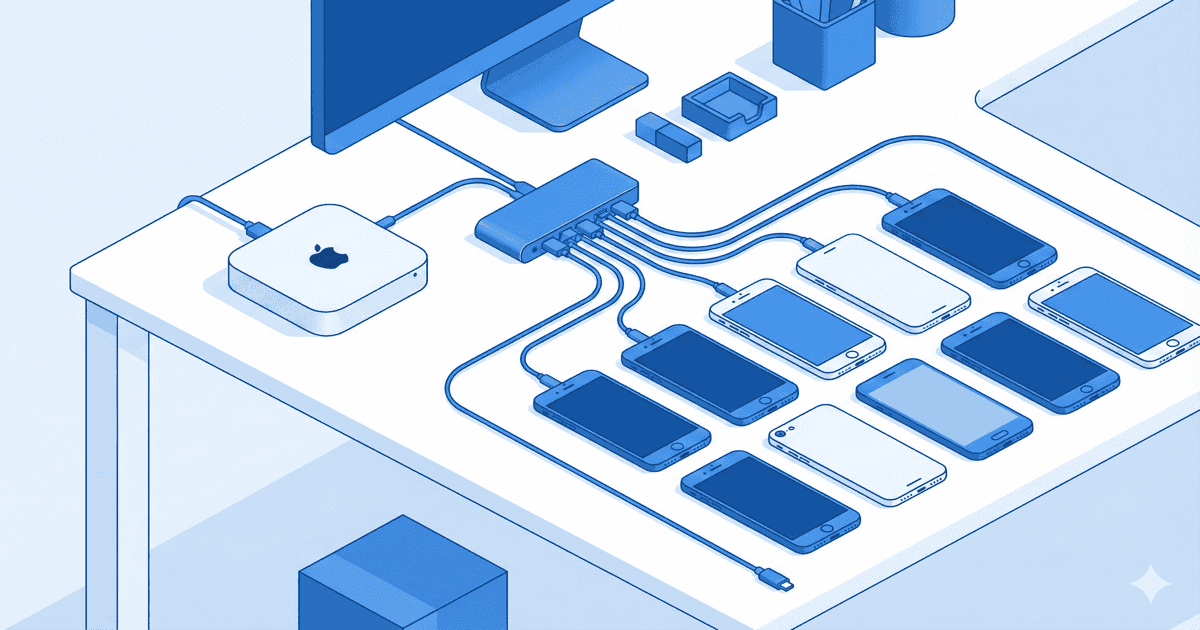
This is the hardware that works. Tested configurations. Exact products. Known compatibility with DeviceLab. No guesswork.
Quick Reference: What to Buy
| Lab Size | Host | Hub | Total Hardware Cost |
|---|---|---|---|
| Starter (10 devices) | Mac Mini M4 | Sabrent HB-BU10 | ~$800 |
| Growth (25 devices) | 2x Mac Mini M4 | Cambrionix SuperSync15 | ~$2,800 |
| Enterprise (50+ devices) | 4x Mac Mini M4 | Cambrionix ThunderSync3-16 | ~$9,500 |
Key principle: As you scale, add more $599 Mac Minis—don’t buy expensive Pro/Studio machines. Distributed beats centralized for resilience, scaling, and cost. This is why enterprises choose private device labs over cloud providers.
Tier 1: Starter Lab (10 Devices)
For teams running their first on-premise device lab. Daily CI/CD, smoke tests, basic regression.
Starter Host Machine
Mac Mini M4 (2024)
- Price: $599
- Specs: M4 chip, 10-core CPU, 16GB RAM, 256GB SSD
- Why: Smallest footprint, excellent value, handles 10-15 iOS devices easily
- Apple Store →
The M4 Mac Mini is a revelation. Five inches square. Fits anywhere. Handles Xcode builds, device connections, and test orchestration without breaking a sweat.
For iOS testing, you need macOS. There’s no way around it. The Mac Mini is the most cost-effective path.
For Android-only labs, you can use Linux. But for mixed iOS/Android testing, Mac Mini is the answer.
Starter USB Hub
Sabrent HB-BU10 (10-Port USB 3.0)
- Price: $60
- Ports: 10 USB-A 3.0
- Power: 60W (12V/5A adapter included)
- Features: Individual power switches per port, LED indicators
- Amazon →
Why Sabrent for starters:
- Individual power switches let you reset stuck devices without unplugging
- 60W power adapter handles simultaneous charging
- Mechanical switches with satisfying click—not mushy membrane buttons
- Tom’s Hardware tested: delivers stable power even under full load
The power switches are game-changers. When a device hangs mid-test, toggle its port off/on. No cable yanking. No walking to the rack.
Starter Cables
Anker PowerLine III (6-pack)
- Price: ~$80 for 6 cables
- Types needed: USB-A to Lightning (iOS), USB-A to USB-C (Android)
- Rating: 25,000+ bend lifespan
- Amazon Lightning → | Amazon USB-C →
Cable quality matters more than you think. Cheap cables cause:
- Intermittent disconnections (flaky tests)
- Insufficient power delivery (devices won’t charge under load)
- Early failure (replacement headaches)
Anker PowerLine III uses double-braided nylon and reinforced stress points. They last years in 24/7 device farm environments.
Complete Starter Kit BOM
| Item | Product | Qty | Unit Price | Total |
|---|---|---|---|---|
| Host | Mac Mini M4 (16GB) | 1 | $599 | $599 |
| Hub | Sabrent HB-BU10 | 1 | $60 | $60 |
| Cables | Anker PowerLine III Lightning | 5 | $13 | $65 |
| Cables | Anker PowerLine III USB-C | 5 | $12 | $60 |
| Total | $784 |
Add your test devices and you’re running tests by end of day.
Tier 2: Growth Lab (25 Devices)
For teams scaling beyond initial proof-of-concept. Parallel test execution, multiple device pools, serious CI/CD integration.
Growth Host Machine
Mac Mini M4 (2024) — Yes, the base model
- Price: $599
- Specs: M4 chip, 10-core CPU, 16GB RAM, 256GB SSD
- Why: Device hosting isn’t CPU-intensive. Save money for more devices.
- Apple Store →
At 25 devices, run 2x Mac Mini M4:
- Each handles 12-13 devices
- Total cost: $1,198 (vs $1,399 for one M4 Pro)
- Redundancy: if one fails, you keep 50% capacity
When to consider M4 Pro ($1,399):
- Running heavy Xcode builds on the same machine
- Need 20+ devices on a single Mac
- Memory-intensive test frameworks
For most device labs, base M4 is plenty. The device is doing the work, not the Mac.
Growth USB Hub
Cambrionix SuperSync15
- Price: $649
- Ports: 15 USB-A 3.0
- Power: 2.1A/10W per port guaranteed
- Features: Individual port control, API/CLI access, Cambrionix Connect software
- Cambrionix →
Why Cambrionix for growth labs:
Enterprise-grade reliability. Google and Uber run hundreds of these in their test farms. They work 24/7 for years without failing.
Guaranteed power delivery. Consumer hubs advertise 2.1A but deliver less under load. Cambrionix guarantees 2.1A to every port simultaneously. Your devices actually charge during test runs.
Software control. Cambrionix Connect lets you:
- Monitor hub status remotely
- Toggle ports via API (integrate with your test framework)
- Schedule power cycling (prevent battery swelling)
- Track device health over time
Battery protection. The API lets you implement charge cycling—keeping batteries between 20-80% extends their lifespan significantly. Essential when devices run 24/7.
From a 2018 Mobile Center forum discussion:
“Following extensive investigation…I would suggest following the advice and obtaining a Cambrionix Hub for significant deployments. We currently use ~30 of them with few issues (private farm of 150 devices).”
The $650 price seems steep until you calculate the cost of replacing devices due to battery swelling from cheap hub charging.
Growth Cables
Same Anker PowerLine III recommendation. Buy in bulk:
- 15x Lightning cables for iOS
- 10x USB-C cables for Android
Complete Growth Kit BOM
| Item | Product | Qty | Unit Price | Total |
|---|---|---|---|---|
| Host | Mac Mini M4 (16GB) | 2 | $599 | $1,198 |
| Hub | Cambrionix SuperSync15 | 2 | $649 | $1,298 |
| Cables | Anker PowerLine III Lightning | 15 | $13 | $195 |
| Cables | Anker PowerLine III USB-C | 10 | $12 | $120 |
| Total | $2,811 |
Two Mac Minis + two SuperSync15 hubs = 30 ports with full redundancy.
Tier 3: Enterprise Lab (50+ Devices)
For teams with dedicated QA infrastructure. Multiple parallel test streams, comprehensive device coverage, enterprise security requirements. If you’re switching from BrowserStack or other cloud providers, this is your target architecture.
Enterprise Host Machines
Always choose: Multiple Mac Mini M4
- 3x Mac Mini M4 = $1,797 (3 × $599)
- Each handles 10-15 devices
- Distributed architecture, easier scaling
- If one fails, others keep running
Why base M4, not M4 Pro?
Device testing doesn’t need Pro-level compute. The Mac is just:
- Hosting USB connections
- Running Appium/XCUITest drivers
- Forwarding commands to devices
That’s not CPU-intensive. The base M4 with 16GB RAM handles 10-15 devices easily. Save the Pro money for more devices or more Macs.
$800 saved per Mac = 2-3 more refurbished test devices for your lab.
Why NOT Mac Studio or single powerful machines:
The instinct is wrong. “I need 50 devices, so I need one powerful machine.” No.
| Approach | Cost | Failure Impact | Scaling |
|---|---|---|---|
| 1x Mac Studio M2 Max | $1,999 | 100% lab offline | Buy bigger machine |
| 3x Mac Mini M4 | $1,797 | 33% capacity loss | Add another Mini |
The math:
- Mac Studio M2 Max handles ~30 devices max before USB/Thunderbolt saturation
- 3x Mac Mini M4 handles 30-45 devices with redundancy
- When (not if) a machine needs maintenance, you lose 1/3 capacity, not 100%
- And you saved $200 vs the “powerful” option
Scaling story:
- Month 1: 1 Mac Mini (10-15 devices) — $599
- Month 6: Add second Mac Mini (20-30 devices) — $1,198 total
- Year 2: Add third Mac Mini (30-45 devices) — $1,797 total
You never rip-and-replace. You just add nodes. This is how real device farms scale—Google, Facebook, and enterprise labs all use distributed Mac Mini clusters, not single supercomputers.
When to consider M4 Pro: Only if you’re also running heavy Xcode builds on the same machine, or need 20+ devices per Mac. For pure device hosting, base M4 is plenty.
Enterprise USB Hub
Cambrionix ThunderSync3-16
- Price: ~$1,500
- Ports: 16 USB-C
- Connection: Thunderbolt 3 upstream
- Power: PD (Power Delivery) capable, up to 60W per port
- Features: 1U rack mount, no USB endpoint limits, enterprise support
Why ThunderSync for enterprise:
Thunderbolt eliminates USB endpoint limitations. Standard USB hubs hit endpoint limits around 15-20 modern devices. Thunderbolt architecture sidesteps this entirely. Connect 16 devices to one hub, daisy-chain up to 6 hubs (96 devices) without bandwidth degradation.
Rack mountable. The 1U form factor fits standard server racks. Professional cable management. Proper airflow. Not a pile of consumer electronics on a desk.
One-click DFU mode (ThunderSync5 models). Put multiple iOS devices into DFU simultaneously. Essential for fleet management and recovery scenarios.
For the newest technology:
Cambrionix ThunderSync5-C16 PD
- Price: ~$2,500
- Thunderbolt 5 (up to 120Gbps)
- 16 USB-C PD ports (up to 60W each)
- 7x faster data transfer than USB 3.0 hubs
- 3-year warranty + 3-year Connect Premium included
This is the hub deployed at “the world’s most demanding mobile device test environments” according to Cambrionix.
Enterprise Kit BOM (50 devices)
| Item | Product | Qty | Unit Price | Total |
|---|---|---|---|---|
| Host | Mac Mini M4 (16GB) | 4 | $599 | $2,396 |
| Hub | Cambrionix ThunderSync3-16 | 4 | $1,500 | $6,000 |
| Cables | Anker PowerLine III USB-C | 50 | $12 | $600 |
| Rack | 12U Server Rack | 1 | $300 | $300 |
| UPS | APC Back-UPS 1500VA | 1 | $200 | $200 |
| Total | $9,496 |
4 Mac Minis at $599 each = distributed, resilient, and $1,800 cheaper than the old 3x M4 Pro recommendation.
Test Devices: Buy Smart
You don’t need the latest iPhone 16 Pro Max for testing. You need devices that represent your user base.
Recommended iOS Devices
| Device | Why | Refurbished Price |
|---|---|---|
| iPhone 13 | Mainstream user base, A15 chip, years of updates | ~$300 |
| iPhone 12 | Large installed base, still supported | ~$230 |
| iPhone SE (3rd Gen) | Budget segment, A15 chip, smallest form factor | ~$180 |
| iPhone 15 | USB-C, Dynamic Island testing | ~$500 |
Recommended Android Devices
| Device | Why | Refurbished Price |
|---|---|---|
| Samsung Galaxy S23 | Largest Android user segment | ~$350 |
| Google Pixel 7 | Stock Android, guaranteed updates | ~$280 |
| Samsung Galaxy A54 | Mid-range testing | ~$200 |
| OnePlus 11 | Performance testing, different skin | ~$300 |
Where to Buy Refurbished
Apple Certified Refurbished
- 15% savings, genuine parts, 1-year warranty
- Limited selection but highest quality
- Apple Refurbished Store →
Back Market
- Up to 40% savings, 1-year warranty
- 100-point inspection process
- Wide selection of grades (Fair/Good/Excellent)
- Back Market →
Gazelle
- 30-point inspection, 30-day returns
- Good for bulk purchases
- Gazelle →
Amazon Renewed
- 90-day return window
- Variable quality depending on seller
- Good for common models
Device Selection Strategy
Start with devices representing your actual user analytics:
- Check your app’s device distribution in analytics
- Cover the top 80% of your users with 5-6 device models
- Add one “problem child” device (the one that always breaks things)
For most apps:
- 2x iPhones (one recent, one 2-3 years old)
- 2x Samsung Galaxy (flagship and mid-range)
- 1x Pixel (stock Android reference)
- 1x “Other” based on your specific user base
Infrastructure Best Practices
Thermal Management
Mobile devices generate heat. Device farms generate a lot of heat.
Room temperature: Keep your lab space at 20-24°C (68-75°F). Higher temperatures accelerate battery degradation and cause thermal throttling during tests.
Airflow: Don’t stack devices. Use racks or stands that allow air circulation between devices.
Monitoring: Use Xiaomi smart home sensors or similar for temperature/smoke alerts. $20 sensor can save your office from a lithium battery incident.
Battery Health
24/7 charging destroys batteries. Implement charge cycling:
With Cambrionix hubs: Use the API to maintain devices between 20-80% charge. Schedule port power-off during non-testing hours.
Without smart hubs: Manually unplug devices overnight. Or accept battery replacement as ongoing maintenance.
Replace batteries proactively. Swollen batteries are fire hazards. Replace any device showing battery swelling immediately.
Power Protection
UPS is mandatory. Power fluctuations corrupt device states and damage hub electronics.
Recommended: APC Back-UPS 1500VA (~$200)
- Protects against surges and brownouts
- Provides 10-15 minutes of runtime for graceful shutdown
- Enough for 3 Mac Minis + hubs
Ground your rack. If using metal racks, ensure proper grounding. Static discharge can damage devices and hubs.
Cable Management
Bad cable management causes:
- Accidental disconnections during tests
- Difficulty identifying which cable goes where
- Physical damage to cables and connectors
Label everything. Use a label maker. Each cable should identify its device.
Velcro > Zip Ties. Never use plastic zip ties. You will overtighten them, crush the cable shielding, and cause data packet loss. Use soft velcro rolls instead.
Use cable management trays. $30 in cable management hardware saves hours of debugging phantom disconnections.
Standardize cable lengths. Use the same length cables where possible. Mixed lengths create tangles.
Frequently Asked Questions
What USB hub is best for a mobile device lab?
For enterprise-grade reliability, Cambrionix SuperSync15 ($649) is the gold standard—used by Google, Uber, and major device farms. For budget builds, Sabrent HB-BU10 ($60) offers excellent value with 10 ports and 60W power delivery.
How many devices can one Mac Mini support?
A base Mac Mini M4 reliably supports 10-15 iOS devices for testing. For larger labs, add more Mac Minis rather than upgrading to Pro—distributed architecture is cheaper and more resilient.
Should I buy new or refurbished test devices?
Refurbished devices from Apple, Back Market, or Gazelle offer 40-60% savings with warranties. An iPhone 13 tests iOS apps identically to new—and costs $300 instead of $700.
What cables should I use for device testing?
Use Anker PowerLine III cables ($12-16 each). They’re rated for 25,000+ bends and deliver stable power. Avoid cheap cables—unstable connections cause test flakiness.
Do I need Thunderbolt USB hubs for device testing?
Only if you’re testing 15+ devices per hub. Thunderbolt eliminates USB endpoint limitations. For smaller labs, USB 3.0 hubs work fine. Cambrionix ThunderSync3-16 is the enterprise choice.
Can I use Windows or Linux machines to save money?
For Android-only labs, Linux works fine. But 99% of teams eventually need iOS automation (XCUITest), which strictly requires macOS. Using Mac Minis from day one future-proofs your lab for both platforms.
One-Click Purchase Lists
We’ve created curated shopping lists with tested hardware combinations:
Starter Lab (10 devices) — Get the curated BOM sent to your inbox →
Growth Lab (25 devices) — Get the curated BOM sent to your inbox →
Enterprise Lab (50+ devices) — Get the curated BOM sent to your inbox →
We’ll reply with direct Amazon links, Cambrionix reseller contacts, and bulk discount codes where available.
The Bottom Line
Hardware anxiety is the last barrier between you and a working device lab.
This list removes that barrier. Every item is tested. Every configuration works. Buy the tier that matches your needs and start testing.
The total hardware cost for a 10-device lab is less than two months of cloud testing fees. After month three, you’re saving money. Forever.
Questions about specific configurations? Contact us → or check the DeviceLab setup guide. New to DeviceLab? Start with our getting started tutorial.
See how DeviceLab compares to the giants: vs BrowserStack | vs Sauce Labs | Read the Cost Analysis →
Hardware doesn’t matter if you can’t orchestrate it. DeviceLab connects your devices to your CI in minutes—$99/device/month, first device free.