
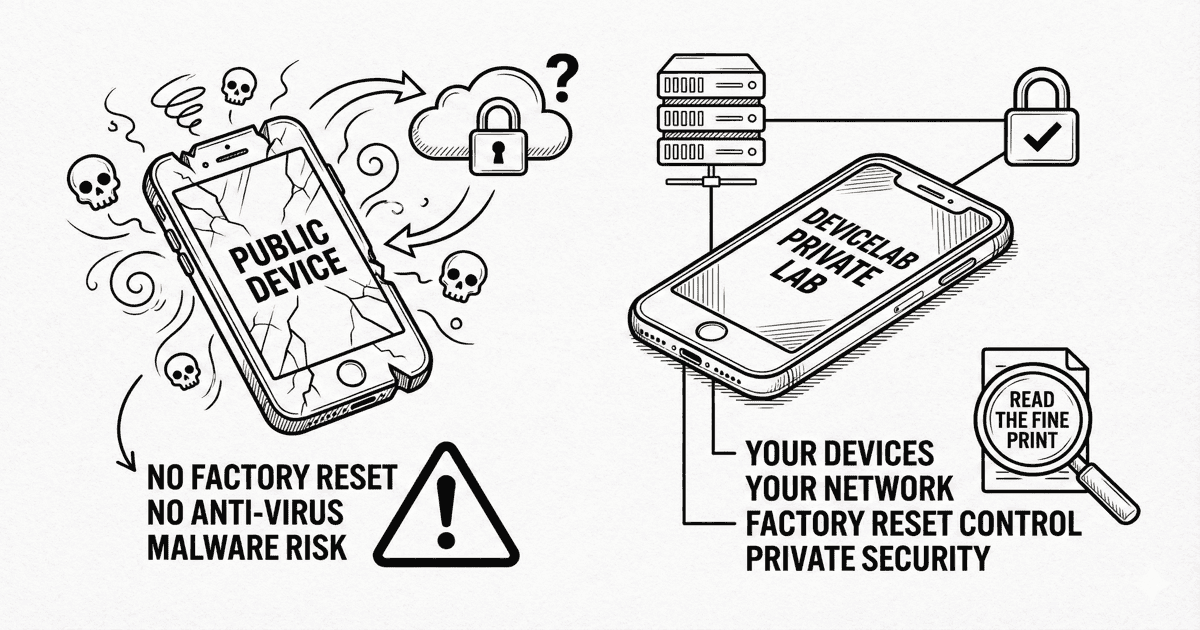
TL;DR: Sauce Labs’ own documentation warns that “sophisticated, persistent malware could be present” on public devices, they don’t perform factory resets, and don’t have anti-virus software installed. Here’s what that means for your mobile testing strategy.
Most teams evaluating cloud testing platforms focus on device coverage, parallel execution, and pricing. Security gets a checkbox: “SOC 2 compliant? ✓ Great, let’s move on.”
But SOC 2 compliance doesn’t tell you what happens to your test data on shared devices. It doesn’t tell you whether the iPhone running your banking app tests was cleaned properly after the previous company’s session. It doesn’t tell you about malware.
Sauce Labs’ documentation does tell you these things. Most teams just don’t read it.
Let’s fix that.
Finding #1: No Factory Reset Between Users
For similar AWS Device Farm warnings, see our AWS security analysis.
This is the first surprise. In the Supported Devices documentation, Sauce Labs states:
“While we take these actions to clean public real devices after each test session, we do not perform factory resets nor do we have anti-virus software installed on them.”
— Sauce Labs: Supported Devices Documentation
Read that again. No factory resets.
For context, a factory reset is the gold standard for device sanitization. It wipes everything: apps, data, accounts, cached credentials, keychain entries. Without it, you’re relying on application-level cleanup—which has known limitations.
Sauce Labs instead performs what they call a cleaning process. According to their Real Device Cleaning documentation, this includes:
- Uninstalling applications
- Clearing user data and settings
- Resetting GPS location to data center coordinates
- Removing media files
- Removing PIN code/password
But explicitly: not a factory reset.
Finding #2: No Anti-Virus Software
The same documentation reveals another surprise:
“We do not perform factory resets nor do we have anti-virus software installed on them.”
— Sauce Labs: Supported Devices Documentation
No anti-virus. On shared devices. Used by thousands of companies.
Why does this matter? Because without anti-virus protection, there’s no automated detection of malicious software that might be installed during a test session—intentionally or not.
Combined with no factory reset, this creates a compounding risk: if malware gets on a device, there’s no automated system to detect it, and the cleanup process may not remove it.
Finding #3: “Persistent Malware” Warning
This is the finding that should make every security team pause. From the same documentation:
“It is possible that other users of the public RDC may engage in malicious, careless or unsecure activity, and that sophisticated, persistent malware could therefore be present on any device in the public RDC.”
— Sauce Labs: Supported Devices Documentation
Let that sink in. Sauce Labs is explicitly warning you that:
- Other users might do malicious things on shared devices
- Sophisticated malware could persist through their cleanup process
- This malware “could be present on any device” in their public cloud
This isn’t speculation or FUD. This is Sauce Labs telling you, in their official documentation, that their public devices might have malware on them.
For comparison, AWS Device Farm’s most concerning statement is that “data may persist between sessions.” Sauce Labs goes further: malware may persist between sessions.
Finding #4: PWA Data Cannot Be Removed
The Real Device Cleaning documentation contains another notable limitation:
“If you test a Progressive Web Application (PWA) and install it on the home screen of the device, make sure that you remove the PWA manually before you close your session. At the moment we can’t remove the PWA and its data during our cleaning process.”
— Sauce Labs: Real Device Cleaning Documentation
This means:
- PWA data persists between sessions
- You must manually remove PWAs before ending your session
- If you forget, the next user may see your PWA and its data
For teams testing PWAs with authentication flows or cached user data, this is a significant gap. Your test user’s session data could be visible to the next company using that device.
Finding #5: Device Reboot ≠ Factory Reset
The cleaning documentation clarifies the difference between their process and a true reset:
“Every 10th cleaning session includes a device reboot.”
— Sauce Labs: Real Device Cleaning Documentation
A reboot restarts the operating system. A factory reset wipes everything and returns the device to its original state. These are fundamentally different operations with different security implications.
The fact that reboots happen only every 10th session suggests that even basic OS-level cleanup isn’t happening between most test runs.
Finding #6: What Sauce Labs DOES Have
To be fair, Sauce Labs isn’t without security measures. They have:
Compliance Certifications:
- SOC 2 Type 2
- ISO 27001
- ISO 27701 (Privacy)
- GDPR compliant
- Data encryption in transit (TLS 1.2+)
- Data encryption at rest (AES 256)
Private Device Option:
From their Private Devices page:
“Get a dedicated pool of devices that are always available and only accessible to members of your organization.”
Private devices solve the “shared infrastructure” problem but come at a significantly higher cost.
Sauce Connect:
Their secure tunneling solution encrypts traffic between your network and Sauce Labs’ cloud, addressing data-in-transit concerns.
The Compliance Gap
Here’s where it gets nuanced. Sauce Labs has SOC 2 Type 2 certification, which is more than AWS Device Farm (which has none). But SOC 2 compliance doesn’t mean:
- Devices are factory reset between sessions
- Malware can’t persist on devices
- Your test data won’t be visible to other users
- The platform is suitable for all workloads
SOC 2 certifies that Sauce Labs has controls in place for security, availability, and confidentiality. It doesn’t certify that shared public devices are sanitized to a level suitable for sensitive workloads.
| What SOC 2 Covers | What SOC 2 Doesn’t Cover |
|---|---|
| Access controls | Device-level sanitization |
| Encryption policies | Malware detection on devices |
| Incident response | Data persistence between sessions |
| Network security | Factory reset guarantees |
What Sauce Labs Is Actually Telling You
Reading the documentation as a whole, Sauce Labs’ message is clear:
- Public devices are shared between all customers
- Cleanup is not comprehensive — no factory reset, no anti-virus
- Malware could be present on any public device
- PWA data persists if not manually removed
- Private devices are available for security-sensitive workloads (at higher cost)
This isn’t a criticism of Sauce Labs—they’re being transparent. The problem is that most teams don’t read the documentation before sending test credentials through their automation suites.
The Security Math
Let’s make this concrete for different use cases:
| Use Case | Public Devices | Private Devices | Your Own Devices |
|---|---|---|---|
| UI compatibility testing | Acceptable | Good | Best |
| Functional testing (no real data) | Risky | Good | Best |
| Testing with real credentials | Not recommended | Better | Required |
| Healthcare/financial apps | Not recommended | Evaluate carefully | Required |
| Apps handling PII | Not recommended | Evaluate carefully | Required |
Sauce Labs themselves recommend caution. The malware warning exists for a reason.
Public vs Private: The Real Trade-off
Sauce Labs offers two tiers:
Public Devices:
- Shared between all customers
- Lower cost
- Broader device selection
- Risk: malware, data persistence, no factory reset
Private Devices:
- Dedicated to your organization
- Higher cost
- You control cleanup settings
- Still Sauce Labs’ infrastructure, not yours
Private devices are better, but you’re still trusting a third party with your test data. The data still flows through Sauce Labs’ network. You’re still dependent on their security practices.
What Are the Alternatives?
If Sauce Labs’ security model doesn’t fit your requirements, you have options:
Option 1: Accept the Risk (Public Devices)
Use public devices for non-sensitive testing only. Never use real credentials. Treat every device as potentially compromised. This works for basic compatibility testing but limits what you can validate.
Option 2: Pay for Private Devices
Sauce Labs’ private devices solve the sharing problem. You get dedicated hardware, configurable cleanup, and isolation from other customers. Cost is significantly higher, but risk is lower.
Option 3: BrowserStack/LambdaTest
Other cloud providers have different security models. BrowserStack claims devices are “restored to factory settings” (though their iOS Keychain documentation suggests limitations). Evaluate each provider’s specific documentation. See BrowserStack compliance for HIPAA considerations.
Option 4: Your Own Device Lab
Use your own devices with infrastructure software like DeviceLab. No shared devices. No third-party data access. Full control over device lifecycle, cleanup policies, and physical security. Learn why enterprises go private and see cloud device lab security risks for a broader compliance perspective. Looking for secure alternatives? We have you covered.
DeviceLab: Sauce Labs Convenience, Private-Lab Security
DeviceLab gives you the benefits of cloud device testing without the malware warnings.
| Feature | Sauce Labs Public | DeviceLab |
|---|---|---|
| Device ownership | Sauce Labs’ devices | Your devices |
| Factory reset | Not performed | You control wipe policy |
| Malware risk | “Could be present” | Your devices only |
| Anti-virus | None installed | Your choice |
| Data flows through | Sauce Labs network | Never leaves your network |
| Compliance scope | Inherits theirs | Inherits your infrastructure |
| PWA cleanup | Manual only | You decide |
How it works:
# Connect your devices (office, data center, home)
curl -fsSL https://app.devicelab.dev/device-node/KEY | sh

# Run tests from anywhere
curl -fsSL https://app.devicelab.dev/test-node/KEY | sh -s -- --framework appium --app ./YourApp.apk
Your test data flows directly between your machines via P2P WebRTC. DeviceLab never sees your apps, tests, or results. We literally can’t—the architecture prevents it.
For organizations that need Sauce Labs’ convenience but can’t accept “malware could be present” as part of their security posture, DeviceLab provides an alternative that’s private by design.
Frequently Asked Questions
Does Sauce Labs factory reset devices between sessions?
No. Sauce Labs documentation states: “We do not perform factory resets nor do we have anti-virus software installed on them.” They perform cleaning tasks like uninstalling apps and clearing data, but not a full factory reset.
Does Sauce Labs have anti-virus on test devices?
No. Their documentation explicitly states they “do not have anti-virus software installed” on public real devices. This means there’s no automated malware detection between test sessions.
Can malware persist on Sauce Labs devices?
Yes. Sauce Labs warns: “sophisticated, persistent malware could therefore be present on any device in the public RDC.” This is their explicit acknowledgment that malware may survive their cleanup process.
Is Sauce Labs SOC 2 compliant?
Yes, Sauce Labs has SOC 2 Type 2 certification, plus ISO 27001 and ISO 27701. However, SOC 2 covers platform-level controls, not device-level sanitization or malware detection on shared devices.
Are Sauce Labs public devices shared between companies?
Yes. Public devices are shared between all Sauce Labs customers. Private devices are available for dedicated access at higher cost, but public devices are used by thousands of companies.
Can PWA data persist between Sauce Labs sessions?
Yes. Sauce Labs states: “At the moment we can’t remove the PWA and its data during our cleaning process.” You must manually remove PWAs before ending your session or the next user may see your cached data.
The Bottom Line
Sauce Labs is transparent about their security limitations. Their documentation explicitly states:
- No factory resets between sessions
- No anti-virus software on devices
- “Sophisticated, persistent malware could be present”
- PWA data cannot be automatically removed
- SOC 2 Type 2 compliant (platform level)
- Private devices available (at higher cost)
If you’re testing apps that handle customer data, authentication credentials, or sensitive information, you need to either:
- Use only private devices and accept the cost premium
- Restrict public device usage to non-sensitive test scenarios
- Move to infrastructure you control
The documentation doesn’t lie. You just have to read it.
See why enterprises choose private device labs: Enterprise Guide | Security Risks | Cost Analysis →
Ready to test on devices you actually control? Start with DeviceLab — your devices, your network, no “malware may be present” warnings.