
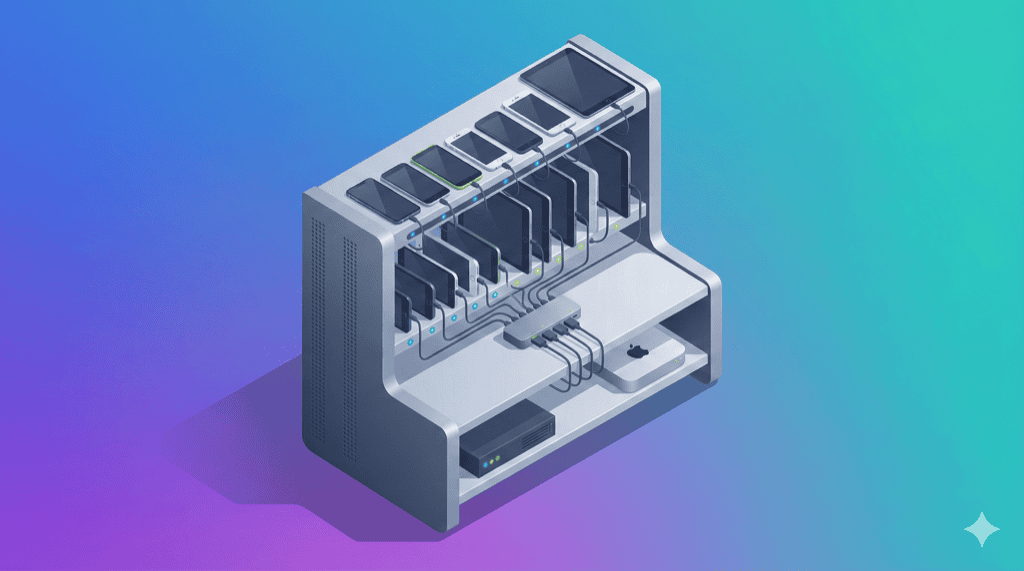
Building your own mobile device lab gives you 24/7 access to real devices, eliminates per-minute cloud billing, and keeps test data on your network. This guide covers everything from hardware selection to software configuration.
Teams at Google, Uber, and Etsy have built internal device labs. Their lessons inform this guide.
Why Build Your Own Device Lab?
Cloud testing platforms charge $0.17-$0.50 per device minute. Heavy testing means heavy bills.
A 10-device in-house lab running 8 hours daily would cost $200-400/day on cloud platforms. Your own lab? Fixed hardware cost, then unlimited testing.
Beyond cost, other reasons to build:
Security and compliance. Test data never leaves your network. Essential for fintech, healthcare, and enterprise apps handling sensitive data.
Physical device access. Test NFC, Bluetooth, camera, biometrics, and hardware-specific behaviors that emulators can’t replicate.
No queue times. Cloud platforms have contention. Your lab is always available.
Local development testing. Test against local servers without exposing development environments to the internet.
What You Need: The Complete Hardware List
Mobile Devices
Start with 8-12 devices covering your user base:
Device Selection Criteria:
- Check analytics for top 10 devices by user traffic
- Mix of iOS and Android
- Flagship, mid-range, and budget tiers
- Various screen sizes (small, standard, large)
- Current and previous OS versions
Sample 10-Device Mix:
| Device | OS | Price Range | Purpose |
|---|---|---|---|
| iPhone 15 Pro | iOS 17 | $999 | Flagship iOS |
| iPhone 13 | iOS 17 | $599 | Previous gen iOS |
| iPhone SE | iOS 17 | $429 | Small screen iOS |
| Samsung Galaxy S24 | Android 14 | $799 | Flagship Android |
| Samsung Galaxy A54 | Android 14 | $449 | Mid-range Samsung |
| Google Pixel 8 | Android 14 | $699 | Stock Android |
| Google Pixel 6a | Android 13 | $349 | Budget Pixel |
| OnePlus 12 | Android 14 | $799 | Chinese market |
| Xiaomi Redmi Note 13 | Android 13 | $199 | Budget Android |
| Samsung Galaxy Tab S9 | Android 14 | $849 | Tablet testing |
Budget tip: Buy refurbished devices. Screen scratches don’t affect automated testing.
USB Hub (Critical Component)
The USB hub is where most DIY labs fail.
Consumer USB hubs provide 500-900mA per port. Smartphones need 2-3A during testing. Result: brown-outs, disconnections, and flaky tests.
From an Acroname case study: “After two weeks of troubleshooting, the team determined that the consumer-grade hub could not provide sufficient power for the devices when booting or under other high-power modes.”
Industrial USB Hub Options:
| Hub | Ports | Power | Price | Best For |
|---|---|---|---|---|
| Cambrionix ThunderSync5-C16PD | 16 | 285W shared, 4.5-60W/port | $1,500+ | Enterprise (Google, Uber use these) |
| Acroname USBHub3c | 9 | Up to 100W/port | $800+ | Programmable power control |
| Coolgear 20-port USB-C | 20 | 27W/port | $300-400 | Good value, ESD protection |
| SIIG 20-port USB 3.0 | 20 | 5V/2.1A per port | $200-300 | Budget option |
Why it matters: Cambrionix customers report cutting test time from hours to minutes by eliminating power-related failures.
Host Computer(s)
You need a computer to run test frameworks and manage devices.
For iOS testing: Mac Mini (required for Xcode, Apple Configurator)
- Mac Mini M2: $599-$799
- Mac Mini M2 Pro: $1,299+ for heavier workloads
For Android testing: Any computer with USB ports
- Intel NUC: $400-$800
- Mini PC: $300-$500
- Existing desktop: $0
For mixed labs: One Mac Mini handles both iOS and Android. Appium runs on macOS.
Additional Hardware
| Item | Purpose | Cost |
|---|---|---|
| USB-C and Lightning cables (certified) | Device connections | $100-$200 |
| Cable management (trays, ties) | Organization | $50-$100 |
| Device mounting rack or shelf | Physical organization | $100-$300 |
| Dedicated WiFi router | Isolated test network | $100-$200 |
| UPS battery backup | Power protection | $150-$300 |
Software Stack Setup
1. Selenium Grid (Test Distribution)
Selenium Grid distributes tests across multiple devices simultaneously.
# Download Selenium Server
wget https://github.com/SeleniumHQ/selenium/releases/download/selenium-4.16.0/selenium-server-4.16.0.jar

# Start hub
java -jar selenium-server-4.16.0.jar hub

# Hub runs on http://localhost:4444
2. Appium (Mobile Automation)
Appium connects Selenium to mobile devices. Traditionally, you run one Appium instance per device.
# Install Appium
npm install -g appium

# Install drivers
appium driver install uiautomator2  # Android
appium driver install xcuitest       # iOS

# Start Appium on different ports for each device
appium --port 4723 --base-path /wd/hub  # Device 1
appium --port 4724 --base-path /wd/hub  # Device 2
3. Device Configuration
Android Setup:
# Enable USB debugging on device, then verify connection
adb devices

# For wireless debugging (optional)
adb tcpip 5555
adb connect <device-ip>:5555
iOS Setup:
- Trust the host computer on each device
- Use Apple Configurator for supervision (optional)
- Install WebDriverAgent via Xcode
4. Appium Node Registration
Register each device with Selenium Grid:
{
  "capabilities": [
    {
      "browserName": "",
      "maxInstances": 1,
      "platformName": "Android",
      "platformVersion": "14",
      "deviceName": "Samsung Galaxy S24",
      "udid": "R5CR1234567"
    }
  ],
  "configuration": {
    "cleanUpCycle": 2000,
    "timeout": 30000,
    "proxy": "org.openqa.grid.selenium.proxy.DefaultRemoteProxy",
    "url": "http://localhost:4723/wd/hub",
    "host": "localhost",
    "port": 4723,
    "maxSession": 1,
    "register": true,
    "registerCycle": 5000,
    "hubHost": "localhost",
    "hubPort": 4444
    }
}
# Register node
appium --port 4723 --nodeconfig device1-config.json
5. CI/CD Integration
Connect your device lab to Jenkins, GitHub Actions, or your CI system.
Jenkins Example:
pipeline {
    agent any
    stages {
        stage('Mobile Tests') {
            steps {
                sh 'mvn test -Dremote.url=http://grid-hub:4444/wd/hub'
            }
        }
    }
}
GitHub Actions Example:
jobs:
  mobile-tests:
    runs-on: self-hosted  # Your device lab server
    steps:
      - uses: actions/checkout@v4
      - name: Run Appium Tests
        run: npm test
        env:
          APPIUM_HUB: http://localhost:4444/wd/hub
Physical Setup Best Practices
Device Mounting
Options from simple to sophisticated:
- Shelf with device stands - Cheap, works for small labs
- Wall-mounted rack - Better organization, saves desk space
- Modular system (Cambrionix ModIT) - Professional, scalable, expensive
Cable Management
Bad cables cause flaky tests. Rules:
- Use MFi-certified Lightning cables
- Use USB-IF certified USB-C cables
- Label each cable-device pair
- Replace cables every 12 months or at first sign of issues
Cooling
10+ phones charging and running tests generate heat. Solutions:
- Position lab away from direct sunlight
- Ensure adequate airflow (don’t stuff in closet)
- Consider a small fan for enclosed racks
Network Isolation
Create a separate network for test devices:
Production WiFi: company-wifi
Test Device WiFi: device-lab-wifi (separate VLAN)
This prevents test traffic from affecting production and simplifies firewall rules.
Battery Management (Often Overlooked)
Devices constantly at 100% charge degrade quickly. Battery swelling is a real problem in device labs.
From Acroname: “When these devices are USB-tethered for extended periods, the battery is held at a high state of charge (SoC). Long-term high SoC can cause battery swelling and ultimately lead to device failure.”
Best Practices:
- Target 40-60% charge when devices are idle
- Use smart hubs with programmable power delivery
- Monitor battery health via ADB (Android) or Instruments (iOS)
- Reduce screen brightness to minimum
- Lock screens between tests to save power
Battery Monitoring Script (Android):
#!/bin/bash
# Check battery level and health
adb shell dumpsys battery | grep -E "level|health|status"
Sample Setup: 10-Device Lab
Hardware Shopping List
| Item | Quantity | Unit Cost | Total |
|---|---|---|---|
| iPhones (mix of models) | 3 | $500 avg | $1,500 |
| Android phones (mix) | 5 | $400 avg | $2,000 |
| Android tablet | 1 | $500 | $500 |
| iPad | 1 | $600 | $600 |
| Mac Mini M2 | 1 | $599 | $599 |
| Coolgear 20-port USB hub | 1 | $350 | $350 |
| Certified cables | 12 | $25 | $300 |
| Mounting rack | 1 | $150 | $150 |
| WiFi router | 1 | $100 | $100 |
| Miscellaneous | - | $200 | $200 |
| Total | $6,299 |
Ongoing Costs (Annual)
| Item | Cost |
|---|---|
| Device refresh (2-3 devices) | $1,000-$1,500 |
| Cable replacement | $100 |
| Electricity | $200-$300 |
| Maintenance time (4 hrs/week x $50/hr) | $10,400 |
| Total | ~$12,000/year |
The maintenance time is the hidden cost. Someone needs to:
- Restart stuck devices
- Update OS versions
- Replace failing hardware
- Debug connectivity issues
- Rotate devices based on analytics
When NOT to Build Your Own Lab
Building isn’t always the answer:
Use cloud instead if:
- You need 100+ different device models
- Testing is sporadic (burst testing)
- Team is globally distributed (cloud provides unified access)
- You don’t have IT bandwidth for maintenance
- Security requirements allow external testing
The hybrid approach:
- Own lab for daily testing (10-20 core devices)
- Cloud for edge case testing (rare devices, old OS versions)
- DeviceLab for connecting your devices to remote team ($99/device/month)
Alternatives to Full DIY
If building from scratch seems overwhelming, these options simplify the process:
DeviceLab - Connect Your Own Devices
Use devices you already own. DeviceLab provides the software layer to:
- Access devices remotely via browser
- Run Appium tests against your devices
- Connect distributed teams to physical devices
- Zero-trust architecture (data stays on your network)
Cost: $99/device/month
Best for: Teams with existing devices who want cloud convenience without cloud data exposure.
Kobiton On-Premise
Enterprise solution for large labs. Kobiton provides:
- Device lab management software
- Integration with CI/CD tools
- Private cloud deployment option
Cost: Custom enterprise pricing
Best for: Large enterprises (100+ devices)
Cambrionix ModIT
Hardware “lab in a box” solution:
- Modular device storage
- Integrated hub and mounting
- Mac Mini integration option
Cost: $2,000-$5,000+
Best for: Teams wanting turnkey physical infrastructure
Frequently Asked Questions
How much does it cost to build a mobile device lab?
A basic 10-device lab costs $3,600-$14,000 for hardware (devices, USB hub, host computer, cables). Ongoing costs include device refresh (20-25% annually), maintenance (4-8 hours/week), and electricity. Total first-year cost typically runs $5,000-$20,000.
What devices should I include in my device lab?
Check your analytics for your users’ top devices. Include a mix of iOS and Android across price tiers (flagship, mid-range, budget), different screen sizes, and recent OS versions. Start with 8-12 devices covering 70-80% of your user base.
Is it cheaper to build a device lab or use cloud testing?
For small teams (under 10 devices), cloud is often cheaper initially. For 20+ devices with heavy daily testing, build breaks even at 12-18 months. The key factors are testing volume, team size, and security requirements.
What USB hub should I use for a device lab?
Use industrial-grade USB hubs, not consumer ones. Consumer hubs lack power (500-900mA vs 3A+ needed) and cause brown-outs during testing. Recommended: Cambrionix ThunderSync ($1,500+), Acroname USBHub3c, or Coolgear 20-port ($200-400).
Do I need separate computers for iOS and Android?
You need a Mac for iOS testing (Xcode requirement). Android can run on any OS. A Mac Mini can run Appium for both platforms, making it the simplest single-computer solution.
Next Steps
Building a device lab is an investment in testing infrastructure. Start small, learn the operational challenges, then scale.
Recommended path:
- Start with 5-8 devices covering core user segments
- Get comfortable with Appium and Selenium Grid
- Automate device health monitoring
- Expand based on coverage gaps in your test suite
Related Guides:
- Device Lab Hardware Requirements - Detailed specs and recommendations
- Device Lab Cost Analysis - Build vs buy calculator
- Private Device Cloud Architecture - Enterprise patterns