
TL;DR: Cloud device testing requires tunnel binaries. They’re slow, flaky, and painful in corporate networks. The root cause is TCP-over-TCP meltdown. P2P WebRTC eliminates the problem entirely.
You’re running your app on localhost:3000. You need to test it on a real iPhone in BrowserStack’s data center. Simple, right?
Not quite. That device can’t see your localhost. It’s in Virginia (or Mumbai, or Sydney). Your laptop is behind your office NAT. To bridge that gap, you need a tunnel binary — BrowserStack Local, LambdaTest Tunnel, or Sauce Connect.
And that’s where the pain begins.
The Tunnel Architecture Problem
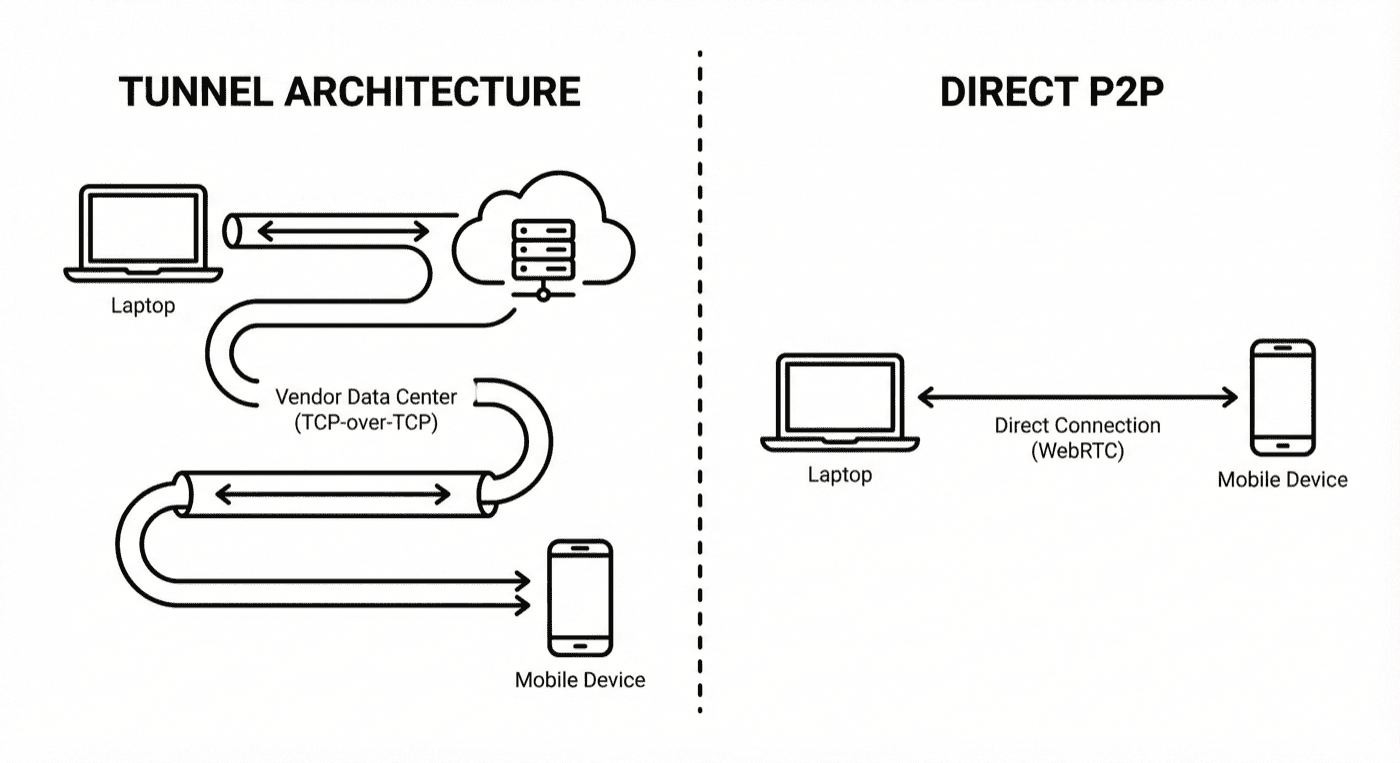
Here’s how cloud device testing actually works when you need localhost access:
Your localhost:3000
       ↓
Tunnel binary on your machine
       ↓
Encrypted connection to cloud gateway
       ↓
Cloud vendor's internal network
       ↓
Device in data center
       ↓
(Response travels back the same path)
Every HTTP request from the device travels this entire chain. Every response comes back the same way. That’s a minimum of 4 network hops, plus encryption/decryption at each boundary.
BrowserStack acknowledges this directly in their documentation:
“This additional routing introduces multiple network hops, which increase page load and interaction response times.”
— BrowserStack FAQ
But latency is just the beginning.
Why Tunnels Are Slow: TCP-over-TCP Meltdown
The real performance killer isn’t the extra hops — it’s a networking pathology called TCP-over-TCP meltdown.
Most tunnel binaries encapsulate your traffic inside a TCP connection. But your app’s HTTP requests are also TCP. You end up with TCP running inside TCP.
Here’s why that’s catastrophic:
TCP uses retransmission to handle packet loss. When a packet doesn’t arrive, the sender waits, then resends it. The timeout increases exponentially to avoid flooding a congested network.
With nested TCP connections, this logic runs twice:
-
Outer layer (the tunnel): A packet is lost on the public internet. The tunnel TCP waits and retransmits.
-
Inner layer (your app): Your app’s TCP sees the delay. It doesn’t know there’s a tunnel — it just sees a timeout. So it also queues a retransmission.
-
Meltdown: The inner layer keeps queuing retransmissions faster than the outer layer can process them. The connection stalls. Throughput collapses.
This isn’t theoretical. OpenVPN’s official documentation warns about it:
“TCP Meltdown occurs when TCP traffic is tunneled over TCP, causing performance issues due to overcompensating retransmissions.”
— OpenVPN FAQ
Academic research confirms it. A 2005 study on TCP tunneling found that even moderate packet loss can cause “TCP meltdown” where throughput drops dramatically due to competing congestion control algorithms.
The freezing, the lag, the timeouts — they’re not random. They’re structural.
The Operational Pain: Ports, Firewalls, and Zombie Processes
Even when the tunnel works, getting it to work is a project in itself.
Port Conflicts
BrowserStack Local requires ports 45690 and 45691. If anything else is using them:
“Ports 45690/45691 are needed by BrowserStack Local to run. If processes other than BrowserStack Local are running on these ports, please try to kill the other process or contact your network admin.”
— BrowserStack Docs
In CI/CD pipelines, a crashed test can leave the tunnel binary running. The next build fails because the port is still held. You end up adding pkill -9 BrowserStackLocal to your scripts as a workaround.
Corporate Firewalls
Most corporate networks don’t allow arbitrary outbound connections. To use BrowserStack Local, you need IT to whitelist their domains:
“Contact the IT team of your organization and request them to allow all traffic for the wildcard domain *.browserstack.com or explicitly allow WSS traffic on ports 80 and 443.”
— BrowserStack Docs
If your network uses SSL inspection (common in enterprises), you need additional exceptions:
“This error occurs when you have SSL inspection enabled in your network. Work with your network administrator to allow traffic to *.browserstack.com to bypass SSL inspection.”
— BrowserStack FAQ
That’s an IT ticket. Maybe several.
VPN Incompatibility
If your developers use VPN (and in 2025, most do), there’s another problem:
“BrowserStack uses custom VPNs on the remote devices to connect to the internet… The VPN or proxy is enabled on all BrowserStack devices and cannot be disabled due to our implementation.”
— BrowserStack FAQ
VPN + tunnel binary + corporate proxy = configuration nightmare.
Binary Version Conflicts
The tunnel binary needs to match the platform. Different versions for Windows, macOS (Intel vs. Apple Silicon), and Linux. If the binary on your CI server is outdated, tests fail with cryptic errors (see our test reporting guide):
“If the same localIdentifier argument is used for a subsequent binary connection, then the earlier connection is disconnected and a new connection is established. This might lead to failure/instability of tests.”
— BrowserStack Docs
What Developers Actually Experience
The GitHub issues tell the story:
Angular Framework Team:
“[BrowserStack] Timeout failures are very frequent… We can not get BS to reply to our support requests… BS is very flaky.”
— angular/angular#12578
Intern Testing Framework:
“I’m suffering from this problem too. It is intermittent, and it seems like actual network failure between the machine running tests and BrowserStack. Right now my team is wrapping every step behind a retry to work around this issue.”
— theintern/intern#905
Port Conflicts:
“LocalError: Either another browserstack local client is running on your machine or some server is listening on port 45691”
— browserstack-runner#211
Tunnel Won’t Stop:
“It seems I am not able to stop the connection to browserstack, after I call the stop() command, I can see the browserstack task is still running”
— browserstack-local-nodejs#36
G2 reviews from 600+ verified users show 287 mentions of “slow performance” and 219 mentions of “testing difficulties.”
This isn’t edge-case complaining. It’s systematic friction.
The Alternative: Same-Network Testing
Here’s the thing: if the device is on the same network as your dev machine, localhost testing is trivial.
BrowserStack even documents this approach:
- Connect mobile and dev machine to same WiFi
- Run
ipconfig/ifconfigto get your local IP - Ensure server listens on
0.0.0.0notlocalhost - Enter
http://192.168.1.x:3000on the device
No tunnel. No binary. No IT tickets. Sub-50ms latency because it’s a direct TCP connection.
The problem is that your device is in a data center and your laptop is in your office. Different networks.
P2P WebRTC: The Tunnel Killer
What if the device could join your network — virtually?
That’s what P2P (peer-to-peer) architectures using WebRTC enable. Instead of routing through a cloud gateway, WebRTC establishes a direct connection between your machine and the device.
WebRTC builds on UDP-based transport, avoiding TCP-over-TCP meltdown:
“This meltdown scenario does not happen with UDP, because UDP does not retransmit anything by itself. In the case of UDP, only the inner TCP connection retransmits lost packets, so nothing stacks up.”
— VPN Tracker Blog
For data channels (used to relay test commands), WebRTC uses SCTP over DTLS over UDP. This layered approach provides:
- Reliable, ordered delivery (like TCP)
- No head-of-line blocking (unlike TCP)
- Encryption (DTLS)
- No meltdown (UDP transport)
WebRTC also handles NAT traversal automatically using ICE (Interactive Connectivity Establishment). It figures out how to connect peers through NATs and firewalls. When direct P2P isn’t possible (restrictive corporate networks), it falls back to TURN relay servers.
How DeviceLab Eliminates Tunnels
DeviceLab uses P2P WebRTC to stream device screens and relay test commands between two components:
- deviceNode: Runs on the machine where devices are physically connected
- testNode: Runs on your laptop or CI runner, proxies commands via WebRTC
Setup:
# On the machine where devices are connected (deviceNode)
curl -fsSL https://app.devicelab.dev/device-node/KEY | sh

# On your laptop or CI runner (testNode)
curl -fsSL https://app.devicelab.dev/test-node/KEY | sh -s -- --framework appium --app ./YourApp.apk
That’s it. No tunnel binary to maintain. No ports to whitelist. No IT tickets.
Testing localhost:
For localhost testing to work without tunnels, your dev server needs to be reachable from where the deviceNode runs:
Scenario 1: Devices on your dev machine
If you run deviceNode on your laptop (devices plugged directly in), localhost:3000 works — your dev server and devices share the same network stack.
Scenario 2: Devices on a remote machine
If deviceNode runs on a Mac Mini in your office while you work from home, use your dev server’s network IP:
- Start your server on
0.0.0.0:3000(not just localhost) - Access via
http://192.168.x.x:3000from the device - If you’re on VPN, ensure the deviceNode machine can reach your dev server’s VPN IP
Either way: no tunnel binary required. The device reaches your server directly over the local network — not routed through a cloud data center.
This works for every framework:
- Maestro:
maestro test flow.yaml— use localhost or network IP - Appium: Point your test at your server address
- Espresso: Instrumentation tests access the server directly
- XCUITest: Same approach — local network, direct connection
- WebDriverIO: Configure
baseUrlwith the appropriate address
No special flags. No tunnel configuration.
Compare this to BrowserStack Maestro setup:
# BrowserStack approach
./BrowserStackLocal --key YOUR_KEY --local-identifier test123

curl -X POST "https://api-cloud.browserstack.com/app-automate/maestro/v2/build" \
  -d '{"local": "true", "localIdentifier": "test123", ...}'
If the binary isn’t running, or the identifier doesn’t match, or the connection dropped — tests fail.
Why it’s faster:
| Metric | Cloud Tunnel | DeviceLab |
|---|---|---|
| Network hops | 4+ (cloud data center) | 0-2 (local/office network) |
| Protocol | TCP-over-TCP | Local TCP or WebRTC (SCTP/DTLS/UDP) |
| Meltdown risk | High | None |
| NAT traversal | Manual (IT tickets) | Automatic (ICE/TURN fallback) |
| Binary management | Required | None |
When Tunnels Make Sense
To be fair, there are scenarios where cloud tunnels are the right choice:
- You don’t own the device: Testing on a device model you’ll never buy
- One-off testing: Quick manual check, not part of CI/CD
- Zero infrastructure: You want someone else to manage everything
But if you’re running automated tests daily, if you have devices in your office or data center, if you’re tired of debugging tunnel issues instead of app issues — the tunnel architecture is working against you. For a full rundown of Sauce Labs alternatives including tunnelless options, see our comparison guide.
The Bottom Line
Cloud device testing tunnels are an architectural compromise from a decade ago. They solved a real problem (bridging networks), but they introduced new problems: TCP meltdown, port conflicts, firewall friction, VPN incompatibility, and CI/CD flakiness.
The vendors know this. That’s why BrowserStack sells “Private Devices” for enterprises who need reliability (see our comparison). That’s why their own documentation recommends same-network testing when possible.
P2P WebRTC is the modern answer. Direct connections. No middleman servers. No nested TCP. No meltdown.
If your devices are on your network anyway — or could be — why route through a data center?
Frequently Asked Questions
What is TCP-over-TCP meltdown?
TCP-over-TCP meltdown occurs when TCP traffic is tunneled inside another TCP connection. Both layers attempt retransmissions independently, causing the inner layer to queue packets faster than the outer layer can process them. This leads to connection stalls and dramatic throughput drops.
Why is BrowserStack Local slow?
BrowserStack Local routes traffic through multiple network hops between your machine and their data center. Combined with TCP-over-TCP tunneling, this introduces latency and potential meltdown conditions. BrowserStack acknowledges this in their documentation — see our BrowserStack Local dropping fixes for specifics.
How do I test localhost on mobile devices without tunnels?
Use same-network testing where devices connect to your local IP directly, or use P2P WebRTC solutions like DeviceLab that establish direct connections without routing through cloud gateways.
What ports does BrowserStack Local require?
BrowserStack Local requires ports 45690 and 45691. If these ports are in use by other processes, the tunnel binary will fail to start.
Does BrowserStack Local work with VPN?
BrowserStack devices have built-in VPN that cannot be disabled. This can conflict with corporate VPNs, causing connection issues when using BrowserStack Local.
Try DeviceLab
Connect your existing devices. Test localhost directly. No tunnels required.