
Your Appium tests run perfectly on your laptop. Your Maestro flows work flawlessly on the phone at your desk. Everything passes.
Then you try to run them on a cloud device lab.
Suddenly you need API keys. Special capabilities. Their URLs. Their SDK. Their upload process. Your code that worked perfectly now needs modifications just to run on someone else’s infrastructure.
Why?
The Cloud Device Lab Bargain
Every cloud device lab makes the same implicit deal:
“Give us your test code, your app binary, and your test data. We’ll run it on our devices. Trust us.”
To accept this deal, you adapt:
Your code changes:
// Before: Works locally
caps.setCapability("app", "./app.apk");
driver = new AndroidDriver(new URL("http://localhost:4723"), caps);

// After: Adapted for their platform
caps.setCapability("cloud.user", "USERNAME");
caps.setCapability("cloud.key", "API_KEY");
caps.setCapability("cloud.app", "cloud://uploaded-app-hash");
caps.setCapability("cloud.device", "Samsung Galaxy S23");
caps.setCapability("cloud.region", "us-west-1");
driver = new AndroidDriver(new URL("https://their-cloud-url/wd/hub"), caps);
Your workflow changes:
- Upload APK to their servers
- Wait for processing
- Configure their specific capabilities
- Debug through their logs
- Trust their security
Your data moves:
- Your APK: on their servers
- Your test data: on their infrastructure
- Your screenshots: in their cloud
- Your credentials: in their logs
This is the price of convenience.
The Question Nobody Asks
Here’s what’s strange: your local setup already works.
- Your machine connects to your phone
- Your tests run against your app
- Results stay on your machine
- No API keys, no uploads, no trust required
The only thing missing is more devices and remote access.
So why does getting more devices require rebuilding everything?
What If It Didn’t?
Imagine this:
# Your tests, your devices, your network
# Nothing changes except which device runs the test
For Maestro:
# Local
maestro test flow.yaml

# Remote (your devices, anywhere)
curl -fsSL https://app.devicelab.dev/test-node/KEY | sh -s -- \
  --framework maestro \
  --app ./app.apk \
  --tests ./flows/
Same YAML. Same flow. Different device.
For Appium:
// Local
caps.setCapability("app", "./app.apk");
driver = new AndroidDriver(new URL("http://localhost:4723"), caps);

// Remote (remove ONE line)
// caps.setCapability("app", "./app.apk");  // DELETE - DeviceLab handles it
driver = new AndroidDriver(new URL("http://localhost:4723"), caps);
Then run:
curl -fsSL https://app.devicelab.dev/test-node/KEY | sh -s -- \
  --framework appium \
  --app ./app.apk
Same test code. Same localhost URL. The tunnel handles the rest.
The Architecture That Makes This Possible
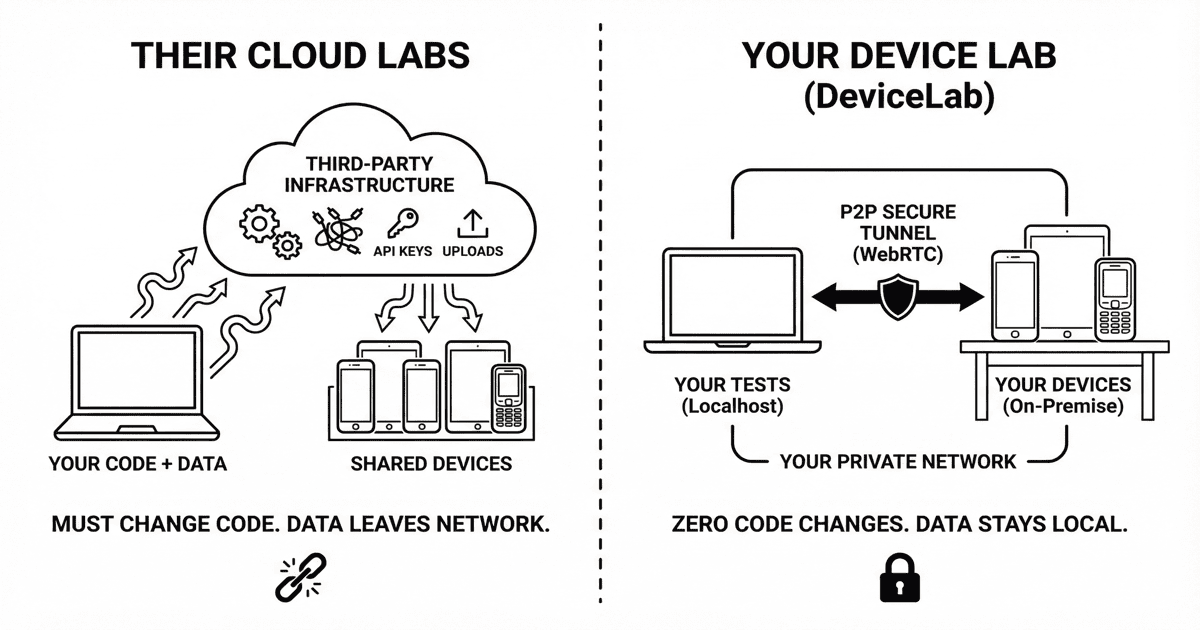
Cloud device labs work like this:
┌──────────────┐     ┌──────────────────┐     ┌──────────────┐
│  Your Tests  │────▶│  Their Cloud     │────▶│ Their Devices│
│              │     │  (sees everything)│    │ (shared)     │
└──────────────┘     └──────────────────┘     └──────────────┘
                            │
                     Your data lives here
Your code, your APK, your test data—all passing through infrastructure you don’t control.
DeviceLab works differently:
┌──────────────┐                              ┌──────────────┐
│  Your Tests  │◀────── WebRTC P2P ──────────▶│ Your Devices │
│  (your machine)                             │(your network)│
└──────────────┘                              └──────────────┘
         │                                            │
         └────────────── Your Network ────────────────┘

       DeviceLab sees: connection metadata only
       DeviceLab never sees: your app, tests, data
Peer-to-peer. Your tests talk directly to your devices. We route the connection; we never see the content.
“We Promise Not to Look” vs “We Can’t Look”
Every cloud provider has security policies. They promise:
- “Your data is encrypted”
- “We don’t access your content”
- “Your tests are isolated”
These are policy promises. Someone could look if they chose to.
DeviceLab makes an architectural promise:
We can’t look because we never receive your data.
| What | Cloud Labs | DeviceLab |
|---|---|---|
| Your APK | Uploaded to their servers | Stays on your network |
| Your test data | Passes through their infra | Direct to your device |
| Your screenshots | Stored in their cloud | Stays on your machine |
| Your credentials | In their logs | Never transmitted |
| Trust model | Policy-based | Architecture-based |
This isn’t a feature. It’s a fundamental design decision.
Your Devices, Everywhere
That phone on your desk? That tablet in the QA lab? The devices in your Tokyo office?
They’re already yours. You already paid for them. They’re already on your network.
# NYC Office Mac Mini
curl -fsSL https://app.devicelab.dev/device-node/KEY | sh -s -- \
  --name "NYC-QA-Lab"

# SF Engineer's Desk
curl -fsSL https://app.devicelab.dev/device-node/KEY | sh -s -- \
  --name "SF-John-Desk"

# Tokyo Office
curl -fsSL https://app.devicelab.dev/device-node/KEY | sh -s -- \
  --name "Tokyo-Office"
Now you have a distributed device lab:
- 15 devices across 3 continents
- All accessible from anywhere
- All tests run on your devices
- All data stays on your network
No hardware to buy. No cloud rental. No monthly per-device fees for devices you already own.
The Real Comparison
| Cloud Device Labs | Your Device Lab | |
|---|---|---|
| Your code | Must adapt to their platform | Stays exactly the same |
| Your data | On their servers | Never leaves your network |
| Your devices | Theirs (shared with strangers) | Yours (owned, controlled) |
| Trust model | “We promise not to look” | “We architecturally can’t look” |
| Cost | Per-device rental fees | Devices you already own |
| Setup | SDKs, configs, learning curve | One curl command |
What This Enables
Parallel testing on your devices:
curl ... --device-count 10 # Run on 10 of your devices simultaneously
Maestro on iOS physical devices:
Maestro doesn’t officially support physical iOS devices. DeviceLab does.
curl ... --framework maestro --platform ios --device-names "John's iPhone"
CI/CD without data exposure:
- name: Run Tests
  run: |
    curl -fsSL https://app.devicelab.dev/test-node/${{ secrets.KEY }} | sh -s -- \
      --framework appium \
      --app ./app.apk
Your CI runs tests. Your devices execute them. Your data never leaves your infrastructure.
The Setup
Step 1: Connect your devices (once)
curl -fsSL https://app.devicelab.dev/device-node/KEY | sh
Devices appear in your dashboard. That’s it.
Step 2: Run your tests (unchanged)
# Maestro
curl -fsSL https://app.devicelab.dev/test-node/KEY | sh -s -- \
  --framework maestro \
  --app ./app.apk \
  --tests ./flows/

# Appium
curl -fsSL https://app.devicelab.dev/test-node/KEY | sh -s -- \
  --framework appium \
  --app ./app.apk
# Then run: pytest / mvn test / npm test
Your tests. Your devices. Your network. No code changes.
Who This Is For
Teams with devices sitting idle:
“We have 20 test phones. They’re only used a few hours a day. The rest of the time they sit in a drawer.”
For teams managing multiple devices, see our guide on scaling mobile test infrastructure.
Teams with security requirements:
“We can’t upload our APK to third-party servers. Compliance won’t allow it.”
Teams with existing tests:
“Our Appium suite works. We just need more devices, not more complexity.”
Teams tired of cloud costs:
“We’re paying $300/device/month to rent devices we could buy for $500.”
The Bottom Line
Your tests already work.
Cloud device labs made you believe you needed to adapt your code, upload your data, and trust their infrastructure to scale your testing.
You don’t.
Your devices. Your network. Your code unchanged.
That’s DeviceLab.
Get Started
# Connect your first device
curl -fsSL https://app.devicelab.dev/device-node/KEY | sh

# Run your first test
curl -fsSL https://app.devicelab.dev/test-node/KEY | sh -s -- \
  --framework maestro \
  --app ./app.apk \
  --tests ./flows/
Or talk to us if you have questions.