
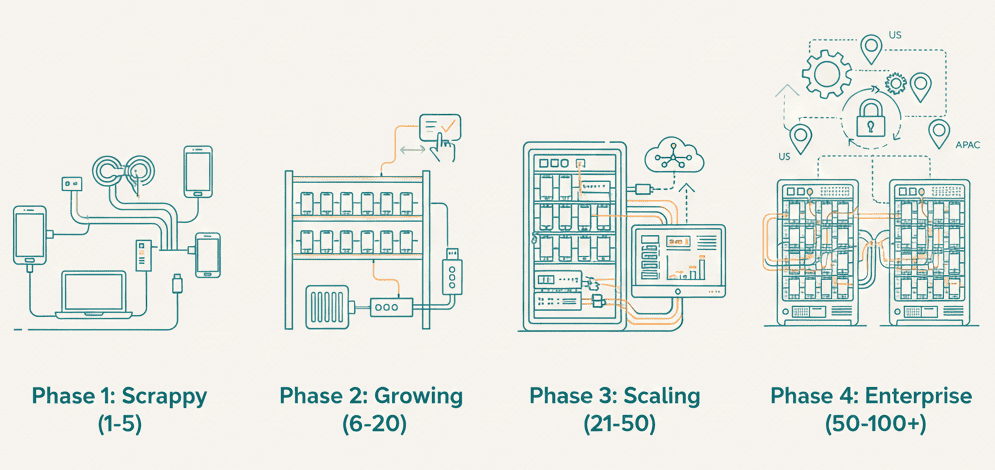
The playbook for each growth phase—from your first device to a production-grade device lab.
Two phones on your desk is a testing setup.
Ten phones in a closet is a problem.
Fifty phones across three offices is an operations challenge that will consume someone full-time.
Most teams don’t plan for scale. They grow into chaos incrementally—adding a device here, a hub there—until one day they realize their “device lab” is held together by duct tape and prayer.
We’ve helped enterprises like Disney, Swiggy, and Airtel build device labs that actually scale. Here’s what we learned about each growth phase—and what you need to survive it.
The Four Phases of Device Lab Growth
Every device lab evolves through predictable phases. Each phase has different constraints, different breaking points, and different solutions.
| Phase | Devices | Typical Team | Key Challenge |
|---|---|---|---|
| Scrappy | 1-5 | Solo dev or small team | Getting started without overthinking |
| Growing | 6-20 | Small QA team | Device conflicts and manual coordination |
| Scaling | 21-50 | Dedicated QA + DevOps | Infrastructure reliability and automation |
| Enterprise | 50-100+ | Multiple teams, locations | Governance, multi-site access, security |
Understanding which phase you’re in—and what’s coming next—is the difference between controlled growth and firefighting.
Phase 1: Scrappy (1-5 Devices)
The goal: Get real device testing working. Don’t overthink it.
At this phase, your “device lab” is probably:
- The phones on your desk
- A shared test device in the team drawer
- Maybe an old phone someone donated
What works:
- USB cables directly to your laptop
- Manual device selection (“I’ll use the Pixel, you take the iPhone”)
- Simple scripts to run tests
What breaks:
Nothing, really. This phase is simple by design.
Mistakes to avoid:
- Over-engineering too early. You don’t need Kubernetes for 3 phones.
- Buying devices you don’t need. Start with your top 3 user devices based on analytics.
- Ignoring the problem. “We’ll deal with it when we scale” = you’ll never be ready.
Investment needed:
| Item | Cost | Notes |
|---|---|---|
| 3-5 devices | $1,500-3,000 | Cover iOS + Android, high + mid range |
| USB cables | $50 | Get quality cables, not dollar store junk |
| USB hub | $100 | Even a basic powered hub helps |
| Total | ~$2,000-3,500 |
When to move on: When you start asking “who has the Pixel?” more than once per day.
Phase 2: Growing (6-20 Devices)
The goal: Establish order before chaos takes over.
This is where most teams first feel pain. You’ve added devices to meet testing needs, but now:
- Two engineers grab the same device simultaneously
- Devices “disappear” into desk drawers
- Test runs fail because someone else is using the device
- USB cables become a tangled mess
For a deeper dive into these challenges, see our guide on managing 10+ devices.
What works:
1. Centralize Physical Location
Stop letting devices live on individual desks. Create one location where all devices live:
- A dedicated shelf or rack
- Proper ventilation (phones get hot during testing)
- Labeled cables and slots
- Charging for all devices simultaneously
2. Basic Device Tracking
You need to know:
- What devices you have
- Who’s using each one
- Which ones are available
A simple Slack channel (#device-lab) with “claiming” and “releasing” messages works at this scale. It’s not perfect, but it’s better than nothing.
3. Powered USB Infrastructure
At 6+ devices, consumer USB hubs fail. Invest in:
- Industrial-grade powered USB hubs (48W+)
- Individual power supplies per hub (don’t daisy-chain power)
- USB 2.0 hubs (USB 3.0 causes more disconnect issues)
What breaks:
- The honor system. Someone will forget to release a device.
- USB stability. Random disconnects become your new normal.
- Parallel testing. Running 10 tests at once requires coordination you don’t have.
Investment needed:
| Item | Cost | Notes |
|---|---|---|
| Additional devices | $2,000-5,000 | Fill coverage gaps |
| Industrial USB hubs (2x) | $400 | Cambrionix or similar |
| Device rack/shelf | $200 | Proper organization |
| Cable management | $100 | Velcro, labels, etc. |
| Total | ~$3,000-6,000 |
When to move on: When manual coordination takes more than 30 minutes per day, or when you’re losing test time to device conflicts.
Phase 3: Scaling (21-50 Devices)
The goal: Automate coordination and make devices a shared service.
At 20+ devices, human coordination breaks down completely. You need systems, not processes.
This is also where many teams hit the “should we just use BrowserStack?” question. The answer depends on your constraints around data privacy, latency, and budget. For many teams, hybrid approaches work best.
What works:
1. Device Management Software
At this scale, you need software that:
- Tracks device status (available, in-use, offline)
- Handles device reservation automatically
- Provides remote access for distributed teams
- Monitors device health (battery, connectivity, responsiveness)
Options include:
| Solution | Pros | Cons |
|---|---|---|
| OpenSTF/DeviceFarmer | Free, open source | Complex setup, maintenance burden |
| Selenium Grid + Appium | Works with existing tools | Manual device management |
| DeviceLab | P2P (your data stays yours), managed | Subscription cost |
| Cloud providers | No hardware to manage | Data leaves your network, per-minute costs |
2. Parallel Testing Infrastructure
With 20+ devices, you should be running tests in parallel. This requires:
- Dynamic port allocation (no hardcoded ports)
- Device pooling with automatic allocation
- Test isolation (each test gets a clean device state)
- Result aggregation across devices
// Example: Dynamic port allocation for Appium
ServerSocket socket = new ServerSocket(0);
int appiumPort = socket.getLocalPort();
socket.close();

AppiumServiceBuilder builder = new AppiumServiceBuilder()
    .withIPAddress("127.0.0.1")
    .usingPort(appiumPort);
3. Health Monitoring
Devices fail silently. At scale, you need automated health checks:
# Example device health check
device_health_check:
  - battery_level: "> 20%"
  - wifi_connected: true
  - screen_responsive: true
  - adb_connection: stable
  - available_storage: "> 1GB"
Quarantine unhealthy devices automatically. Don’t waste test runs on devices that will fail.
4. CI/CD Integration
At this scale, devices should integrate with your pipeline. If you’re seeing tests passing locally but failing in CI, proper device management is often the fix.
# GitHub Actions example
jobs:
  mobile-tests:
    runs-on: self-hosted
    steps:
      - name: Request device from pool
        id: device
        run: devicelab claim --platform android --version 14

      - name: Run tests
        run: ./gradlew connectedAndroidTest
        env:
          DEVICE_UDID: ${{ steps.device.outputs.udid }}

      - name: Release device
        if: always()
        run: devicelab release ${{ steps.device.outputs.udid }}
What breaks:
- USB at scale. Even industrial hubs struggle above 20 devices.
- Single points of failure. One server goes down, all testing stops.
- Remote access. Engineers in other locations can’t reach devices.
Investment needed:
| Item | Cost/Month | Notes |
|---|---|---|
| Additional devices | $5,000-15,000 (one-time) | Cover more OS versions, OEMs |
| Dedicated server(s) | $200-500 | For device management software |
| Networking equipment | $500-1,000 (one-time) | Reliable switches, WiFi APs |
| Device management software | $0-5,000 | Depending on solution |
| Dedicated space | Variable | Climate control matters |
| DevOps time | 10-20 hrs/week | This is the hidden cost |
When to move on: When you have devices in multiple locations, or when one person can no longer manage the infrastructure.
Phase 4: Enterprise (50-100+ Devices)
The goal: Treat devices as infrastructure, not equipment.
At enterprise scale, your device lab is no longer a “project”—it’s production infrastructure that multiple teams depend on. Treat it accordingly.
What works:
1. Multi-Site Architecture
With devices in multiple offices or data centers:
- Each site runs independently (no single point of failure)
- Central dashboard for visibility across all sites
- Automatic failover (if Bangalore is down, route to Hyderabad)
- Consistent tooling across all locations
2. Role-Based Access Control
Not everyone needs access to everything:
# Example RBAC configuration
roles:
  developer:
    - claim_devices: own_team_only
    - max_duration: 4_hours
    - device_types: [android]

  qa_lead:
    - claim_devices: all
    - max_duration: 24_hours
    - device_types: [android, ios]
    - can_reserve_for_others: true

  admin:
    - full_access: true
    - can_provision_devices: true
    - can_modify_health_checks: true
3. Capacity Planning
At this scale, you need data-driven decisions:
- Utilization metrics: Are devices sitting idle or constantly queued?
- Wait times: How long do engineers wait for devices?
- Failure patterns: Which devices fail most often?
- Coverage analysis: Do you have the right device mix for your users?
-- Example: Find underutilized devices
SELECT device_id,
       AVG(utilization_pct) as avg_utilization,
       COUNT(DISTINCT date) as active_days
FROM device_usage
WHERE date >= CURRENT_DATE - INTERVAL '30 days'
GROUP BY device_id
HAVING AVG(utilization_pct) < 20
ORDER BY avg_utilization ASC;
4. Security and Compliance
Enterprise device labs must address:
- Data isolation: Test data doesn’t leave your network
- Audit logs: Who accessed which device, when, and what they did
- Device sanitization: Factory reset between uses for sensitive testing
- Network segmentation: Devices on isolated VLANs
This is why many enterprises avoid cloud device farms for sensitive applications—your app binaries and test data go to their servers.
5. Disaster Recovery
- Regular backups of device configurations and management software
- Documented procedures for common failures
- On-call rotation for device infrastructure
- SLAs for device availability
What breaks:
- Organizational complexity. Multiple teams with different needs, conflicting priorities.
- Hardware lifecycle. Devices age out faster than you expect.
- Vendor lock-in. Switching management software becomes painful.
- Cost visibility. No one knows the true cost of device infrastructure.
Investment needed:
| Item | Annual Cost | Notes |
|---|---|---|
| Device fleet | $50,000-150,000 | Refresh ~30% annually |
| Infrastructure | $20,000-50,000 | Servers, networking, power |
| Software/services | $20,000-100,000 | Management platform, monitoring |
| Personnel | $100,000-200,000 | 1-2 dedicated FTEs |
| Facilities | Variable | Space, cooling, security |
| Total | $200,000-500,000+ |
At this scale, the build vs. buy decision becomes critical. Many enterprises find that a hybrid approach—own devices for data-sensitive testing, cloud for coverage testing—optimizes cost and capability.
The Hidden Costs Nobody Talks About
When planning device lab scale, most teams underestimate:
1. Device Depreciation
Phones have a 2-3 year useful life for testing. Budget for 30-40% refresh annually.
| Year | Starting Devices | Need to Replace | Cost (at $500/device avg) |
|---|---|---|---|
| 1 | 50 | 0 | $0 |
| 2 | 50 | 15 | $7,500 |
| 3 | 50 | 20 | $10,000 |
| 4 | 50 | 15 | $7,500 |
2. Operations Overhead
Device labs don’t run themselves. Budget engineering time:
| Scale | Weekly Hours | Common Tasks |
|---|---|---|
| 1-5 | <1 | None really |
| 6-20 | 2-5 | Troubleshooting, cable management |
| 21-50 | 10-20 | Automation, health monitoring, support |
| 50-100+ | 20-40 (FTE) | Everything + capacity planning |
3. Opportunity Cost
Time spent managing device infrastructure is time not spent on:
- Writing better tests
- Improving test frameworks
- Actually testing your app
This is why managed solutions become attractive at scale—they convert unpredictable operations work into predictable spend.
Decision Framework: Build vs. Buy vs. Hybrid
Build Your Own Device Lab
Best for:
- Strong data privacy requirements (finance, healthcare, government)
- Need for specialized devices (SIM-enabled, carrier-specific)
- High test volume that would be expensive on cloud
- Control over device configurations
True cost: 2-3x the hardware cost when you factor in operations
Use Cloud Device Farms
Best for:
- Teams without infrastructure expertise
- Variable testing needs (burst capacity)
- Wide device coverage for compatibility testing
- Quick start without capital investment
Watch out for:
- Per-minute pricing adds up fast at scale
- Latency to remote devices (especially for performance testing)
- Data leaving your network
For more on this tradeoff, see our comparison of cloud device farms vs. own devices.
Hybrid Approach
Best for: Most teams at scale
- Core devices on-premise: Devices you use daily, high-security testing
- Cloud for coverage: Exotic devices, OS versions you rarely need
- Managed on-premise: Your devices, managed like cloud
This is what DeviceLab enables—your physical devices, accessible from anywhere via P2P without tunnels, without the cloud’s data and latency tradeoffs.
The Scaling Readiness Checklist
Before adding more devices, make sure you have:
Phase 1 → Phase 2
- Centralized physical location for devices
- Basic tracking (even if it’s just Slack)
- Powered USB hubs (not consumer-grade)
Phase 2 → Phase 3
- Device management software (not spreadsheets)
- Automated health monitoring
- CI/CD integration
- Parallel testing capability
- Documentation for common issues
Phase 3 → Phase 4
- Multi-site architecture (if applicable)
- Role-based access control
- Utilization and capacity metrics
- Security and compliance procedures
- Disaster recovery plan
- Dedicated personnel or managed service
What We Learned Building Enterprise Device Labs
After 12 years of building device infrastructure for some of the largest mobile teams in India, here’s what we know:
-
Start simple, but plan for scale. The decisions you make at 5 devices affect what’s possible at 50.
-
Automate coordination, not just testing. Most time is lost to “who has the device?” not “how do I run tests?”
-
Treat devices as cattle, not pets. Any device should be interchangeable. If losing one device breaks your testing, you’ve done it wrong.
-
Remote access is table stakes. If devices can’t be accessed remotely, you’ll always be limited by physical location.
-
Data privacy drives architecture. For many enterprises, “just use the cloud” isn’t an option. Your architecture must account for this.
This is why we built DeviceLab. Your devices, anywhere, without the tradeoffs of cloud device farms. P2P connections mean your app and test data never touch our servers. Automatic health monitoring and allocation mean you get cloud-like convenience with on-premise control.
Start Where You Are
You don’t need to build a 100-device lab on day one. Start with what you have, plan for what’s coming, and build incrementally.
The goal isn’t a perfect device lab. It’s a device lab that grows with you without breaking.
See how DeviceLab compares to the giants: vs BrowserStack | vs Sauce Labs | Read the Cost Analysis →
Scaling your device lab? DeviceLab turns your physical devices into a managed device cloud—accessible from anywhere, with automatic health checks and allocation. First device free forever. $99/device/month, no per-minute charges.