
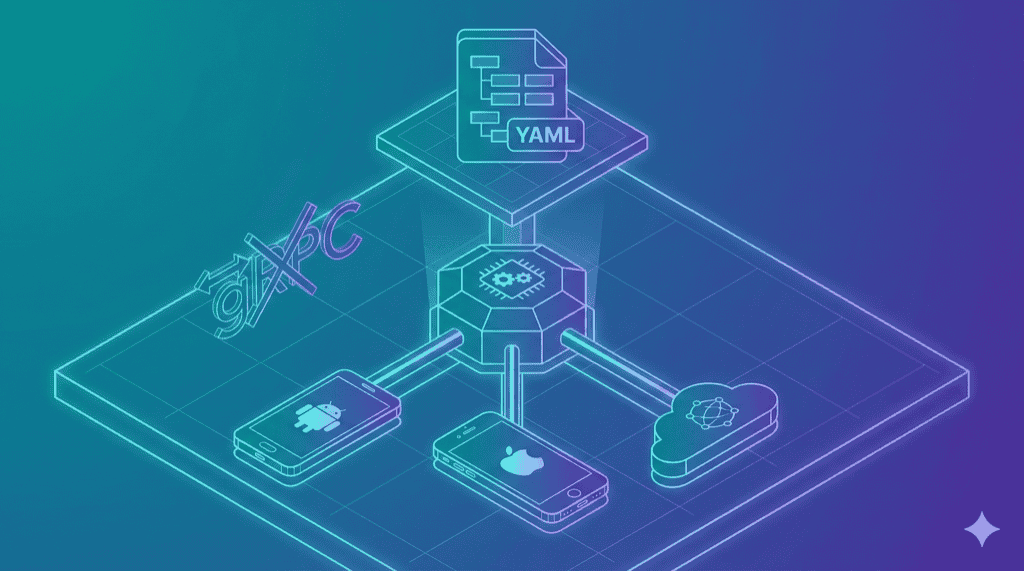
Maestro’s execution path has four hops to tap a button:
YAML -> Kotlin Orchestrator -> gRPC Client -> gRPC Server (on device) -> UIAutomator2
Two serialization boundaries. A JVM on both ends. We looked at that chain and asked a different question: which layers can we remove entirely?
The answer was most of them.
Killing gRPC
This is the single most important architectural decision in maestro-runner, so let’s start here.
Maestro uses gRPC – Protocol Buffers over HTTP/2, with code-generated stubs in Kotlin and Java – to communicate between the host runner and the on-device server. The on-device server is a modified UIAutomator2 app on Android, an XCTestRunner process on iOS. It accepts commands and returns results.
Here’s what gRPC gives you: strongly-typed contracts, streaming, bidirectional communication, language interoperability.
Here’s what you actually need to tap a button on a phone: send a JSON payload over HTTP. Get a JSON response back.
That’s it.
UIAutomator2 already has an HTTP/JSON API. WebDriverAgent already has an HTTP/JSON API. Appium already has an HTTP/JSON API. Every device automation server on earth speaks HTTP natively. Maestro wraps these existing HTTP servers in a gRPC layer – which means protobuf schema maintenance, generated code on both sides, an extra serialization round-trip on every command, and errors that lose their context crossing the gRPC boundary. You get io.grpc.StatusRuntimeException: UNKNOWN instead of the actual failure reason from the device.
We removed the entire layer. maestro-runner talks HTTP directly to whatever is running on the device:
maestro-runner -> HTTP/JSON -> UIAutomator2 (Android)
maestro-runner -> HTTP/JSON -> WebDriverAgent (iOS)
maestro-runner -> HTTP/JSON -> Appium server (cloud)
Fewer moving parts. Lower latency. And when something fails, the error message comes straight from the source – not filtered through two serialization boundaries and a connection pool.
The Maestro issue tracker is full of gRPC-related crashes. These are not bugs in the traditional sense. They are consequences of architecture. Connection pool timeouts, stream multiplexing failures, keepalive timer races – all of this machinery exists to solve a problem that does not exist. The device server is already an HTTP server. Just talk to it.
The Hidden Insight: Shared Page Source Parsing
Here is something that is not obvious until you have built drivers for two platforms.
Both Android and iOS return their UI hierarchies as XML. But the schemas are completely different. Android uses node elements with text, resource-id, and class attributes. iOS uses XCUIElement types with value, name, and identifier attributes. Different tag names, different attribute names, different nesting conventions.
Maestro handles this by splitting the parsing logic between the Kotlin runner and the on-device servers. Some normalization happens on the device, some on the host. The seam is invisible when it works and maddening when it doesn’t – because a bug in element matching could live in either place, and the gRPC boundary between them makes debugging a two-process problem.
maestro-runner normalizes both formats into a common Element tree, entirely on the host side. One parser, one tree structure. Selector matching, relative positioning (below, above, leftOf, rightOf), and visibility calculations all operate on this shared representation. Fix a selector bug once, it works on both platforms. No ambiguity about where the logic lives.
This is the kind of decision that does not show up in a feature list but determines how fast you can ship fixes. When a user reports that below: "Email" does not work on iOS, we know exactly where to look. One file, one code path, one fix.
Three Drivers, Three Problems
The core design is a Driver interface:
type Driver interface {
    Execute(step flow.Step) *CommandResult
    Screenshot() ([]byte, error)
    Hierarchy() ([]byte, error)
    GetState() *StateSnapshot
    GetPlatformInfo() *PlatformInfo
    SetFindTimeout(ms int)
    SetWaitForIdleTimeout(ms int) error
}
Seven methods. That is the entire contract between the runner and the outside world. The runner calls Execute() with a parsed step, the driver does whatever platform-specific work is needed, and returns a result. Everything above this interface – YAML parsing, flow orchestration, report generation – has no idea which driver is running.
But the three implementations are not just a “pluggable backends” exercise. Each one exists because it solves a specific problem that the others cannot.
UIAutomator2: The fast path
The default Android driver. It talks directly to the UIAutomator2 HTTP server running on the device – no Appium in between, no gRPC, no middleman. The UIAutomator2 server APKs are bundled with the binary and auto-installed on the device if not present.
This is where the architecture pays off most. Maestro routes Android commands through gRPC to its own on-device server, which then calls UIAutomator2. We removed one entire process from the chain. The performance difference is not marginal – it is the primary reason maestro-runner runs 2-3x faster on Android. (Full numbers in the benchmarks post.)
WDA: The platform Apple forgot
iOS testing has a tooling problem. Apple provides XCTest for unit and UI tests, but no standalone automation server for external tools. WebDriverAgent fills that gap – it is an XCTest runner that exposes an HTTP API for element queries, gestures, and screenshots.
The WDA driver builds from source using Xcode on first run, then caches per iOS version. For physical devices, code signing is handled via --team-id. See the complete iOS setup guide. The design tension here was build complexity versus distribution simplicity. Bundling a pre-built WDA framework would be smaller, but it breaks across Xcode versions and architectures. Building from source means the first run takes longer, but it always works.
Appium: The escape hatch
Some teams have existing Appium infrastructure. Some need cloud execution on BrowserStack, Sauce Labs, or LambdaTest. Some need device types we do not support directly.
The Appium driver connects to any Appium-compatible server. A fresh session is created per flow file – clean isolation, no state leaks between tests. It is intentionally the slowest driver (Appium adds its own abstraction layer), but it is the one that lets you run maestro-runner against anything, anywhere.
The design question was whether to build cloud-specific drivers. We chose not to. Appium is the lingua franca of cloud device providers. One driver covers them all, and teams that already have Appium configs can reuse them without translation.
Parallel Execution and Dynamic Ports
Two features that sound like small additions but required the architecture to be right from the start.
Parallel execution works by spinning up one goroutine per device, each owning its own driver instance. A shared work queue distributes flows – faster devices pick up more tests automatically. No static sharding where a slow device holds up its shard while others sit idle. No shared mutable state between devices.
But parallelism only works if multiple instances can coexist on the same machine. Maestro hardcodes port 7001 for its Android gRPC server and port 22087 for iOS. Run two instances and they collide. maestro-runner allocates dynamic ports per device – parallel runs, multiple CI jobs on one machine, development alongside CI, all work without conflict.
These are not features we added. They are features the architecture did not prevent.
What This Gets You
Three numbers that matter:
| Metric | Maestro | maestro-runner |
|---|---|---|
| Startup time | 4-6s | 0.02s |
| Peak memory | 350-400 MB | 22-27 MB |
| Error messages | StatusRuntimeException: UNKNOWN |
Plain text from source |
The full benchmark data – per-test numbers, resource consumption, CI impact, methodology – is in the benchmarks post.
The Shape of the System
The bet is straightforward: a mobile test runner should be a small binary that talks HTTP to device servers, with pluggable backends and no intermediary layers.
Maestro proved that YAML is the right interface for mobile UI tests. We agree completely. We just think the execution engine underneath should be a lot leaner.
The source is at github.com/devicelab-dev/maestro-runner. Apache 2.0.