
TL;DR: Maestro doesn’t officially support physical iOS devices. We built maestro-ios-device to fix that. Your existing YAML flows work unchanged on real iPhones.
The Problem Everyone Hits
You wrote your Maestro tests. They pass on the iOS Simulator. Now you want to run them on a real iPhone.
You discover: Maestro doesn’t support physical iOS devices.
This has been the most requested feature since January 2023. Three years of GitHub issues. The Maestro team says official support won’t land until sometime next year. For other open issues, see 15 Maestro GitHub Issues You Should Know.
If you’re here, you probably don’t want to wait.
Does Maestro Support Real iOS Devices?
Not officially. As of December 2025:
| Platform | Simulators | Real Devices |
|---|---|---|
| Android | Yes | Yes |
| iOS | Yes | No |
Cloud providers like BrowserStack offer workarounds by running Maestro on their infrastructure. But if you want to test on your own devices — the ones sitting on your desk — you’re stuck.
Until now.
The Solution: maestro-ios-device
We built a bridge that connects Maestro to physical iOS devices.
What it does:
- Runs your existing Maestro YAML flows on real iPhones
- No changes to your test files
- Supports parallel testing on multiple devices
- Works with iOS 16.x through 18.x
What it doesn’t do:
- Require a cloud subscription
- Send your app or test data anywhere
- Change how you write Maestro tests
Quick Start
1. Install the tool:
curl -fsSL https://raw.githubusercontent.com/devicelab-dev/maestro-ios-device/main/setup.sh | bash
2. Start the device bridge:
maestro-ios-device --team-id YOUR_TEAM_ID --device DEVICE_UDID
3. Run your tests:
maestro --driver-host-port 6001 --device DEVICE_UDID --app-file /path/to/app.ipa test flow.yaml
Your existing flows work unchanged:
appId: com.example.app
---
- launchApp
- tapOn: "Login"
- inputText: "[email protected]"
- tapOn: "Submit"
- assertVisible: "Welcome"
Parallel Testing on Multiple iPhones
Here’s something that wasn’t possible before: running Maestro tests on multiple real iOS devices simultaneously.
The original Maestro codebase had hardcoded port limitations. We removed them.
Terminal 1:
maestro-ios-device --team-id ABC123 --device IPHONE_12_UDID --driver-host-port 6001
Terminal 2:
maestro-ios-device --team-id ABC123 --device IPHONE_14_UDID --driver-host-port 6002
Now run your test suite split across devices. Cut your CI time in half (or more).
How It Works
Maestro’s iOS driver was built for simulators. We extended it to recognize and communicate with physical devices.
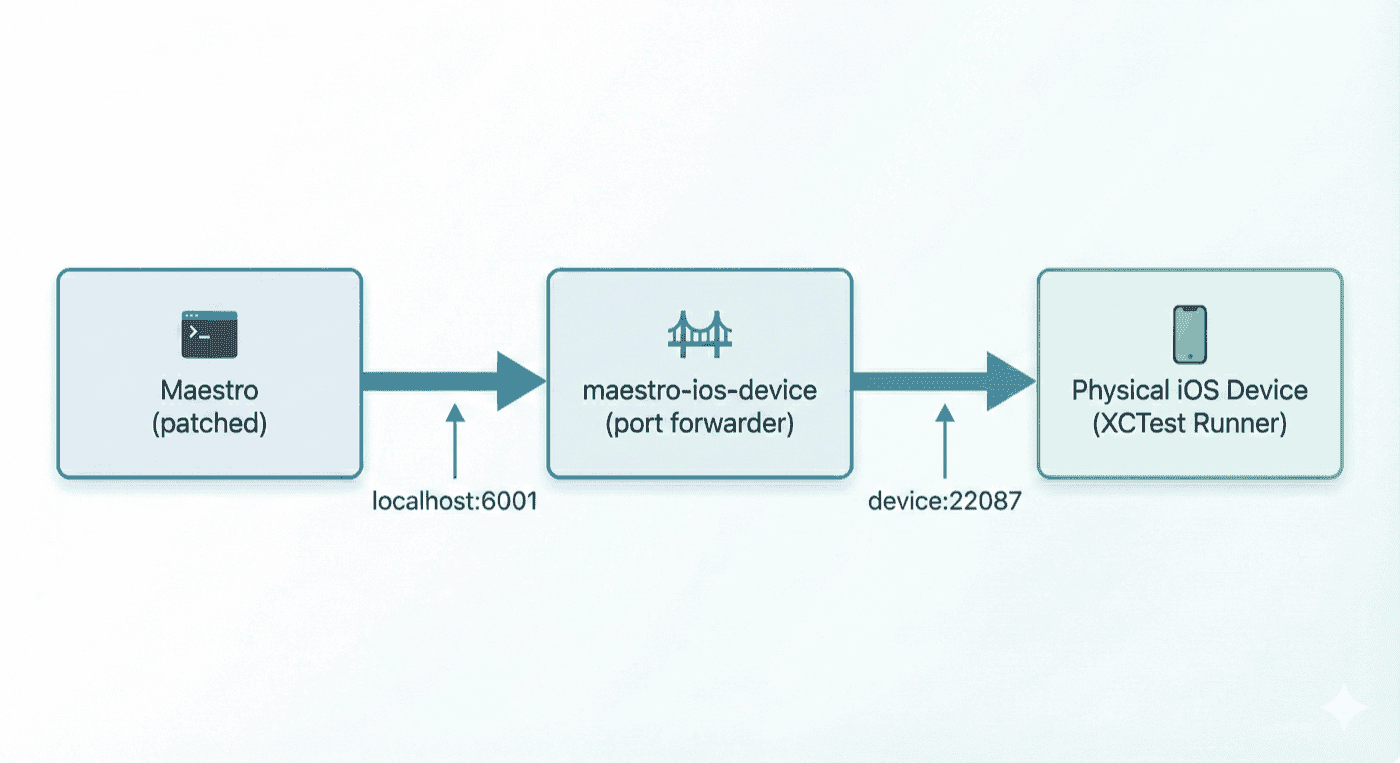
Four things happen under the hood:
- Device Detection — Recognizes physical devices with Developer Mode enabled
- XCTest Runner — Builds and deploys the test driver to actual hardware (requires Apple Developer certificate)
- Port Forwarding — Bridges localhost to the device’s HTTP server
- Session Management — Handles real-device constraints gracefully (e.g.,
clearStatevia app reinstall)
What Works, What Doesn’t
We’re transparent about limitations. Some are ours, most are Apple’s:
| Command | Status | Notes |
|---|---|---|
launchApp |
Works | — |
tapOn |
Works | — |
inputText |
Works | — |
assertVisible |
Works | — |
clearState |
Works | Reinstalls app (requires --app-file) |
setLocation |
Limited | Requires additional setup |
addMedia |
No | iOS platform restriction |
Why We Built This
We run DeviceLab — a platform that lets teams test on their own physical devices. Our customers kept asking for Maestro support.
We looked at the Maestro codebase. The foundation for iOS device support existed — infrastructure PRs had been merged, but the last mile was missing.
So we finished it.
We submitted PR #2856 to give it back to the community. But PRs take time to merge, and teams need solutions now.
That’s why we released maestro-ios-device as a standalone tool.
Compatibility
| Maestro Version | Status |
|---|---|
| 2.0.10 | Tested |
| 2.0.9 | Tested |
| Other versions | Not tested |
Requirements:
- macOS (Xcode required for code signing)
- Apple Developer account (free or paid)
- iOS device with Developer Mode enabled
FAQ
Is this official Maestro?
No. This is an unofficial community tool. Not supported by mobile.dev or the Maestro team. When official iOS device support ships, we recommend switching to it.
Will my existing tests work?
Yes. If your YAML flows run on the iOS Simulator, they’ll run on real devices with no changes.
Do I need to pay for anything?
The tool is free. You need an Apple Developer account (the free tier works for personal devices).
How is this different from BrowserStack/LambdaTest?
Those services run Maestro on their devices in their cloud. This runs on your devices in your office. No data leaves your network. For CI/CD integration, see Maestro CI/CD: GitHub Actions & Jenkins. For a full comparison with Appium, see Maestro vs Appium 2025.
Links
- Tool: github.com/devicelab-dev/maestro-ios-device
- PR: github.com/mobile-dev-inc/Maestro/pull/2856
- Original Issue: github.com/mobile-dev-inc/maestro/issues/686
Built by DeviceLab — turn your devices into a testing lab without renting someone else’s.