
HeadSpin was a $1.1 billion “unicorn” in mobile testing. Then the fraud was discovered.
The founder went to prison. The valuation crashed to $300 million. The company was sold to a private equity firm in what sources called a “fire sale.”
If you’re evaluating HeadSpin — or looking to leave — here’s what you need to know in 2025.
The Fraud Scandal: What Happened
In April 2024, HeadSpin co-founder and former CEO Manish Lachwani was sentenced to 18 months in federal prison plus a $1 million fine.
The charges:
- 2 counts of wire fraud
- 1 count of securities fraud
What he did:
According to the U.S. Department of Justice, Lachwani inflated HeadSpin’s annual recurring revenue (ARR) from approximately $10 million to $80 million. He created fake invoices, altered real ones, and claimed revenue from customers who had never agreed to pay.
The scheme raised over $100 million from investors — including Tiger Global — and briefly pushed HeadSpin’s valuation past $1 billion.
When the board discovered irregularities in 2020, they investigated. The valuation crashed from $1.1 billion to $300 million. Lachwani resigned.
Current status:
In July 2024, private equity firm PartnerOne acquired HeadSpin. TechCrunch reported it as a “fire sale.” The former CEO, COO, and CTO all departed. Some long-term employees reportedly received nothing in the transition.
PartnerOne’s CFO stated: “HeadSpin itself was a victim, it was not the culprit.”
The product still exists. The company still operates. But the uncertainty matters if you’re making a multi-year platform commitment.
What HeadSpin Actually Costs
HeadSpin doesn’t publish pricing. Here’s what real users report:
| Source | Cost |
|---|---|
| Indian enterprise (PeerSpot) | 35-40 lakhs INR/year (~$42,000-$48,000) for 16 devices |
| SourceForge | Starts at $30/month (basic) |
| General consensus | “Expensive” with yearly contracts only |
Key constraints:
“It has a yearly license. There is no other option. It is expensive. There are a lot of other cheaper players in the market, but it is like a Mercedes. You pay an extra premium for it, but you get the benefits.”
— PeerSpot review
“I would love to see them come up with project-based costing. Companies that are low on funds or new-age can do with pricing that is easily digestible.”
— PeerSpot review
No free tier. Only a 14-day trial.
No monthly contracts. Yearly commitment required.
No transparent pricing. Custom quotes only.
For comparison: BrowserStack starts at $39/month with monthly billing. AWS Device Farm charges $0.17/minute with no commitment. See our detailed HeadSpin pricing breakdown for the full analysis.
The 7-9 Second Latency Problem
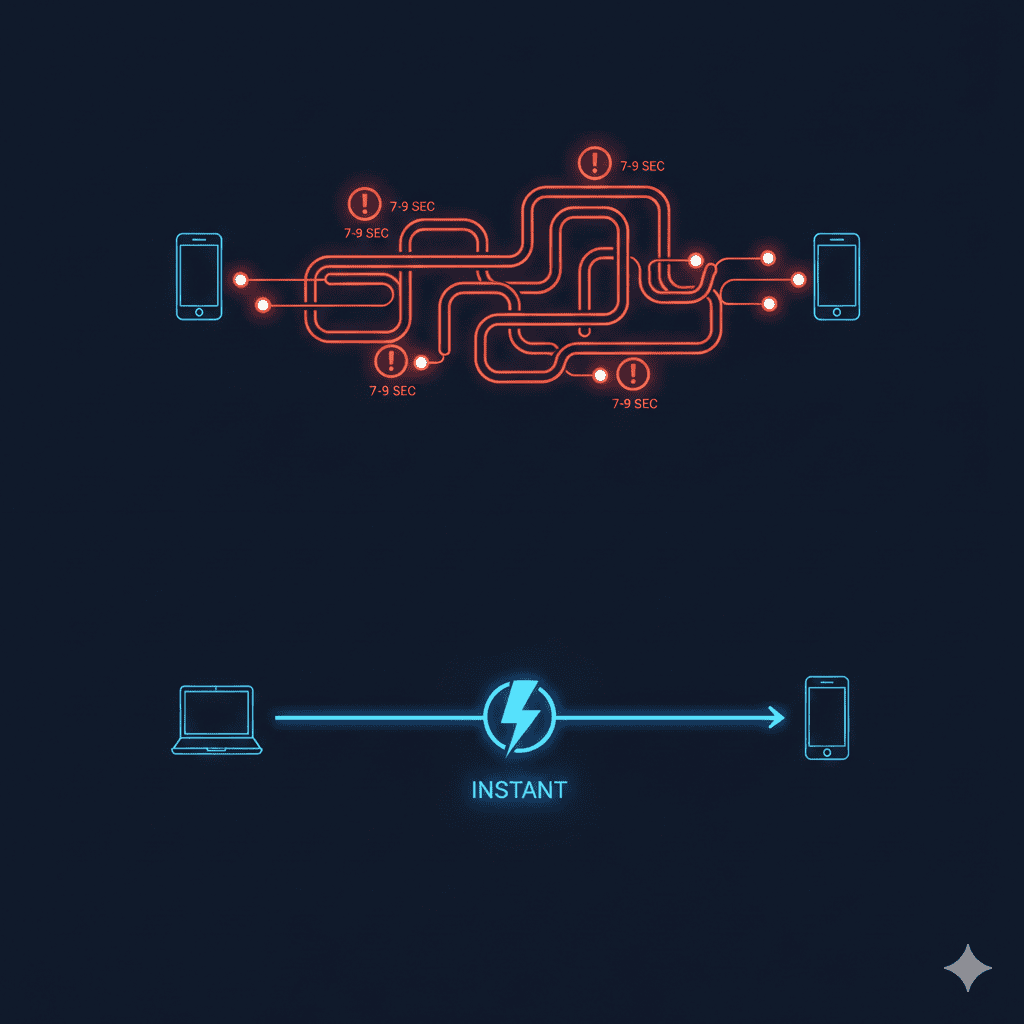
The most consistent complaint in user reviews: HeadSpin is slow.
“First of all, it’s very laggy. Not with the UI, but when you interact with the remote devices, I think the latency is seven to nine seconds. That means that there is a seven- to nine-second delay on average when you click on certain things.”
— PeerSpot review
“If you want to do some testing or check the devices manually or check the application in a particular device manually, it is really laggy. That’s a disappointment because sometimes we would like to do manual testing when our local devices are not available.”
— PeerSpot review
Seven to nine seconds per interaction. For manual testing, that’s painful. For debugging, it’s brutal.
Why it matters:
A simple 10-tap user flow takes 70-90 seconds just in latency overhead. Multiply that across exploratory testing sessions, and you’re losing hours per week.
Compare to testing on a local device: zero latency.
Complex UI, Steep Learning Curve
HeadSpin packs features. Users say that’s a problem.
“HeadSpin users say the platform’s UI is complex and confusing, specifically for new users.”
— Medium comparison article
“Confusing user interface. Dashboard can be improved and the speed can also be improved.”
— G2 review
“The service is extremely feature packed and that means there’s quite a technical complexity to it, upskilling an end user is quite easy but getting more technical specialists involved in things like Performance testing or Automation does take a significant amount of effort and time.”
— SoftwareReviews
G2 scores tell the story:
| Metric | HeadSpin | BrowserStack |
|---|---|---|
| Ease of Use | 8.3 | 8.9 |
| Product Direction | 7.7 | 9.3 |
That “Product Direction” score of 7.7 reflects user concerns about HeadSpin’s roadmap — likely amplified by the fraud scandal and PE acquisition.
Devices Go Offline (Especially iOS)
Shared cloud infrastructure means you don’t control the hardware. Users notice.
“Devices sometimes go offline, and some features do not function on some devices, especially on iOS.”
— PeerSpot review
“Hardware improvements are needed, as mobile battery life reduces quickly and requires continuous charging.”
— PeerSpot review
iOS-specific issues:
“tvOS devices can’t be connected to Wi-Fi. You have to change the location and use a different Wi-Fi or VPN for each device. Mobile devices can be connected, but it’s not there yet for tvOS devices.”
— PeerSpot review
If your app targets Apple TV or requires specific iOS configurations, HeadSpin has gaps.
Manual Onboarding, Limited Reporting
Two recurring complaints from enterprise users:
Onboarding is manual:
“They should automate their onboarding. A lot of things are still manual. They can create a video assistant or something like that to completely automate the entire process.”
— PeerSpot review
“There is great scope to improve professional services. The time to deploy is quite long.”
— PeerSpot review
Reporting is limited:
“HeadSpin is the limited flexibility in custom data visualization and reporting options. While it offers valuable insights, the platform could benefit from more customizable dashboards and interactive reporting tools.”
— SoftwareReviews
You’re paying enterprise prices but building workarounds for basic needs.
What HeadSpin Does Well
Fair assessment: HeadSpin isn’t all problems.
Unique strengths:
-
AV Box Testing — Patented feature for testing streaming quality. They ship physical hardware to your location. No competitor offers this.
-
130+ Performance KPIs — Deep metrics on app, device, and network performance. More granular than most alternatives.
-
Global Device Infrastructure — 90+ locations with SIM-enabled devices. Good for carrier-specific testing.
-
Technical Support — Users consistently praise support quality.
“The technical support is really helpful because we can set up direct calls with them if we want to. We can use Zoom or Google Meet to interact with them directly.”
— PeerSpot review
If you need streaming QoE testing or carrier network validation, HeadSpin has capabilities others don’t.
HeadSpin vs BrowserStack
The most common comparison. Here’s how they stack up:
| Factor | HeadSpin | BrowserStack |
|---|---|---|
| Focus | Mobile + performance analytics | Web + mobile testing |
| Starting Price | Custom (expensive) | $39/month |
| Contract | Yearly only | Monthly available |
| Ease of Use (G2) | 8.3 | 8.9 |
| Product Direction (G2) | 7.7 | 9.3 |
| Support Quality (G2) | 9.1 | 8.7 |
| Device Coverage | 90+ locations | 20,000+ devices |
| Web Testing | Limited | Full support |
| Market Share | 0.6% | 10.4% |
Choose HeadSpin if:
- You need streaming/AV quality testing
- Carrier network testing is critical
- Deep performance analytics matter more than ease of use
Choose BrowserStack if:
- You test web and mobile
- Budget predictability matters
- You want faster onboarding
- You prefer market-leader stability
Full Alternatives Comparison
BrowserStack
Best for: Teams needing web + mobile testing with easy setup
- 20,000+ real devices and browsers
- Starts at $39/month
- Easier UI than HeadSpin
- Strong product roadmap (G2: 9.3)
- Free trial available
Limitations: Less depth on performance analytics. Shared infrastructure. See our BrowserStack alternative guide for details.
Sauce Labs
Best for: Enterprise teams with complex CI/CD needs
- Comprehensive test automation platform
- Good Jenkins/CI integration
- Enterprise security features
- Virtual and real devices
Limitations: Expensive at scale. Learning curve for full platform. See our Sauce Labs alternative guide and pricing breakdown.
Kobiton
Best for: Mid-market teams wanting real device access
- Real device cloud with on-prem option
- Scriptless automation available
- Lower price point than HeadSpin
- 30 FPS testing speed
Limitations: Smaller device selection. Per-minute pricing creates unpredictable costs. Users report shared device reliability issues. See our complete Kobiton analysis.
AWS Device Farm
Best for: AWS-native teams with pay-as-you-go needs
- $0.17/minute pricing
- No upfront commitment
- Integrates with AWS ecosystem
- Real devices, not emulators
Limitations: 150-minute test limit. Oregon region only. iOS entitlements stripped. See our AWS Device Farm documentation gaps guide and AWS Device Farm security analysis.
Perfecto (Perforce)
Best for: Enterprise teams needing compliance features
- Strong in regulated industries
- Comprehensive test reporting
- Part of Perforce suite
- Pricing from $300/month with 12-month minimum
Limitations: Expensive. Complex licensing. Users report latency issues. Perfecto offers similar enterprise positioning with ML-powered analytics.
DeviceLab
Best for: Teams wanting control without cloud constraints
- Your own devices, your network
- $99/device/month
- Zero-trust architecture — data never leaves your premises
- No latency (direct WebRTC connection)
- Works with Appium, Espresso, XCUITest, Maestro
Limitations: You manage your own hardware. Requires initial device investment.
Decision Matrix: When to Use What
| Your Priority | Best Choice |
|---|---|
| Streaming/AV quality testing | HeadSpin (unique feature) |
| Web + mobile testing | BrowserStack |
| Lowest starting cost | AWS Device Farm |
| Data never leaves your network | DeviceLab |
| Carrier network testing | HeadSpin |
| Fastest setup | BrowserStack |
| No monthly costs at scale | DeviceLab (fixed fee) |
| AWS ecosystem | AWS Device Farm |
| On-premise option | Kobiton or DeviceLab |
Why Teams Leave HeadSpin
Based on user reviews and competitive research, common exit triggers:
-
Fraud scandal concerns — Uncertainty about company stability post-acquisition
-
Cost at scale — $42K+/year for 16 devices adds up. Predictable alternatives exist.
-
Latency frustration — 7-9 seconds per interaction kills productivity
-
Complexity fatigue — Steep learning curve without proportional benefit
-
Contract inflexibility — Yearly-only contracts don’t fit agile budgets
-
iOS limitations — tvOS issues, device offline problems
-
Reporting gaps — Enterprise needs, basic customization
Migration Checklist: Leaving HeadSpin
If you’re switching, plan for:
1. Export your data
- Performance baselines
- Test scripts (Appium/Selenium compatible)
- Historical reports
2. Map framework compatibility
- HeadSpin supports Appium, Selenium, Espresso, XCUITest
- Most alternatives support the same
- Check specific version requirements
3. Recalculate costs
- HeadSpin: Yearly contract, device-based
- BrowserStack: Monthly, usage-based tiers
- DeviceLab: $99/device/month, predictable
- AWS: $0.17/minute, variable
4. Test latency
- Trial your alternative with real test scenarios
- Compare interaction speed
- Factor in CI/CD pipeline impact
5. Validate coverage
- Device models you need
- iOS versions (especially for entitlement-dependent features)
- Geographic locations if relevant
The Private Device Lab Alternative
HeadSpin, BrowserStack, Sauce Labs — they all share a model: you rent access to someone else’s devices.
That model has inherent constraints:
- Data passes through third-party infrastructure
- Shared devices mean potential persistence issues
- Latency from remote connections
- Pricing scales with usage
The alternative: run tests on devices you own.
What changes:
- Zero latency (devices on your network)
- Data never leaves your premises
- No per-minute costs
- No entitlement stripping on iOS
- No 150-minute timeouts
What you trade:
- You buy and maintain hardware
- You need physical space for devices
- Initial setup takes longer than cloud signup
For teams running 50+ test hours per week, the economics favor ownership. For teams with compliance requirements, it may be the only option. Learn more about why enterprises use private device labs.
Frequently Asked Questions
Why did HeadSpin’s founder go to prison?
Manish Lachwani, HeadSpin’s co-founder and former CEO, was sentenced to 18 months in prison in April 2024 for wire fraud and securities fraud. He inflated the company’s ARR from approximately $10 million to $80 million using fake invoices, defrauding investors of over $80 million.
How much does HeadSpin cost?
HeadSpin uses custom pricing with yearly contracts only. Real user data shows enterprise customers paying $42,000-$48,000 per year for 16 devices. Basic plans reportedly start around $30/month, but most enterprise deployments cost significantly more.
What are the main problems with HeadSpin?
Users report 7-9 second latency when interacting with remote devices, complex/confusing UI, devices going offline (especially iOS), steep learning curve, expensive yearly-only contracts, and limited reporting customization.
Who bought HeadSpin after the fraud scandal?
PartnerOne, a private equity firm, acquired HeadSpin in July 2024 in what sources described as a “fire sale.” The former CEO, COO, and CTO all departed after the acquisition.
What are the best HeadSpin alternatives?
Top alternatives include BrowserStack (easier to use, lower starting price), Sauce Labs (enterprise-focused), Kobiton (mid-market pricing), AWS Device Farm (pay-as-you-go), and DeviceLab (own your devices, $99/device/month).
Is HeadSpin still safe to use after the fraud?
The product continues to operate under new ownership (PartnerOne). The fraud was committed by the founder personally, not a product flaw. However, the PE acquisition creates uncertainty about long-term product direction, and G2’s “Product Direction” score of 7.7 reflects user concerns.
Does HeadSpin offer monthly pricing?
No. HeadSpin requires yearly contracts. There’s no monthly billing option, which reduces flexibility compared to alternatives like BrowserStack ($39/month) or AWS Device Farm (pay-per-minute).
Summary
HeadSpin offers legitimate testing capabilities — especially for streaming QoE and carrier network testing.
But the context matters:
| Factor | Reality |
|---|---|
| Company stability | Founder imprisoned, sold to PE in fire sale |
| Pricing | $42K+/year, yearly contracts only |
| Latency | 7-9 seconds per remote interaction |
| Complexity | Steep learning curve, complex UI |
| iOS issues | Devices offline, tvOS limitations |
| Product direction | G2 score: 7.7 (below competitors) |
For teams where streaming quality testing is critical and budget isn’t constrained, HeadSpin’s unique features may justify the cost and risk.
For everyone else, alternatives offer better value, easier setup, or more control.
Want device testing without cloud constraints? DeviceLab connects your own devices for Appium, Espresso, XCUITest, and Maestro testing — $99/device/month, zero latency, data stays on your network.