
BrowserStack is the market leader in cloud device testing. Over 50,000 companies use it. Amazon, PayPal, Nvidia—the logos on their website are impressive.
The pricing page is less straightforward.
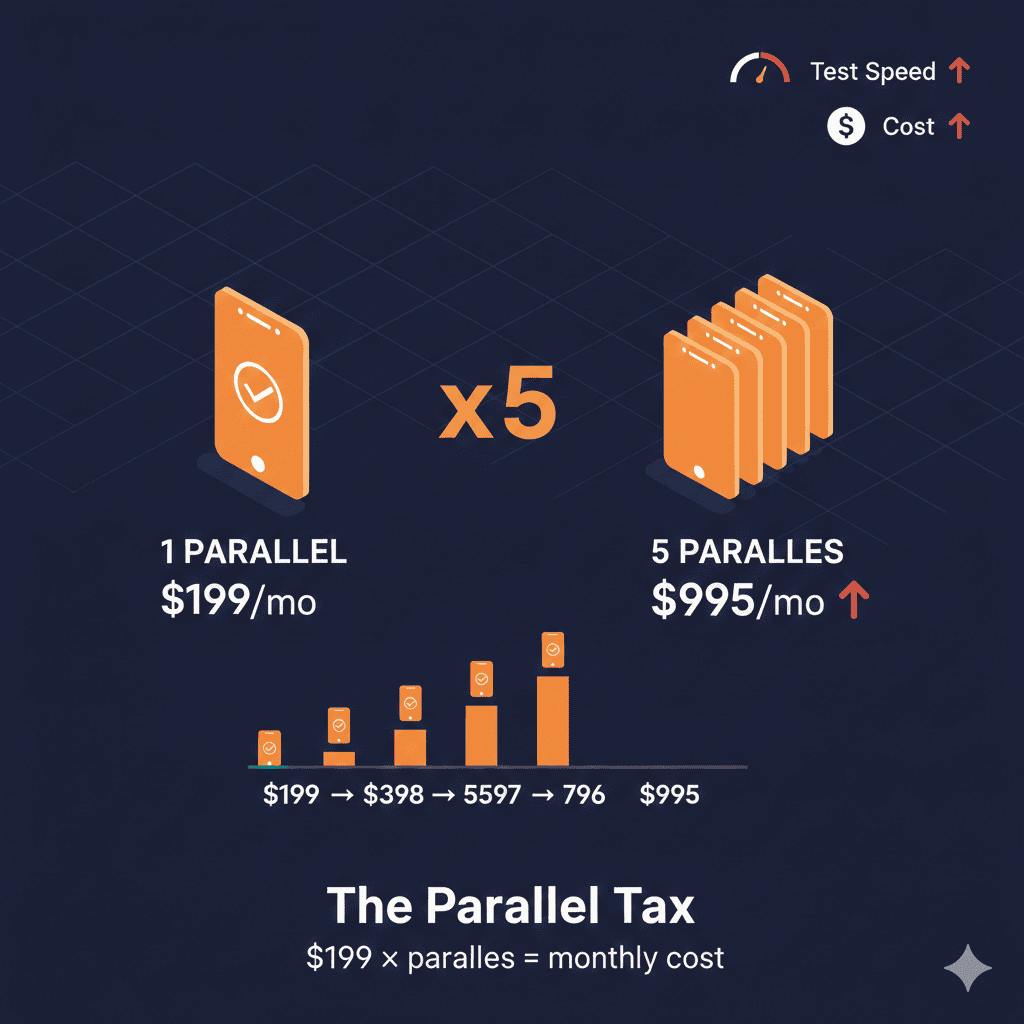
App Automate starts at $199/month for one parallel test. That sounds reasonable until you realize a single parallel means running one test at a time. Your 30-minute regression suite stays a 30-minute suite.
Need to run 5 tests simultaneously? That’s $995/month. Ten parallels? $1,990/month.
Welcome to parallel-based pricing—where scaling your automation scales your bill at the same rate.
The Official App Automate Pricing
BrowserStack separates mobile app testing into two products:
App Live (Manual Testing):
| Plan | Price (Annual) | Users |
|---|---|---|
| Individual | $39/mo | 1 user |
| Team | $150/mo | 5 users |
| Team Pro | $249/mo | 5 users + device features |
| Enterprise | Contact sales | Custom |
App Automate (Automated Testing):
| Plan | Price (Annual) | Per Parallel |
|---|---|---|
| Device Cloud | $199/mo | 1 parallel |
| Device Cloud Pro | $249/mo | 1 parallel |
| Enterprise | Contact sales | Custom |
The critical detail: each additional parallel multiplies the base price.
The Parallel Math Problem
Let’s calculate what different automation scenarios actually cost.
Scenario 1: Solo Developer
- 1 parallel, basic automation
- Device Cloud: $199/month ($2,388/year)
This works for light testing. One test runs at a time.
Scenario 2: Small Team CI/CD
- 5 parallels to run tests faster
- Device Cloud: 5 × $199 = $995/month ($11,940/year)
Your 30-minute suite now runs in 6 minutes. But you’re paying nearly $12K annually.
Scenario 3: Growing Engineering Team
- 10 parallels for faster feedback
- Device Cloud: 10 × $199 = $1,990/month ($23,880/year)
You’re approaching $24K/year for the base plan—without Pro features.
Scenario 4: Enterprise Scale
- 25+ parallels across multiple teams
- Device Cloud Pro: 25 × $249 = $6,225/month ($74,700/year)
At this point, you’re negotiating enterprise contracts. According to procurement data from Vendr, the average BrowserStack enterprise contract runs approximately $32,000 annually—and that’s across all products, not just App Automate.
The Pro Plan Feature Lock
BrowserStack’s Device Cloud plan includes the basics: real devices, Appium support, debugging tools. But several features mobile teams actually need are locked behind the Pro plan.
Features requiring Device Cloud Pro ($249/parallel):
| Feature | Device Cloud | Device Cloud Pro |
|---|---|---|
| SIM card (OTP/2FA) | ❌ | ✅ |
| Apple Pay testing | ❌ | ✅ |
| Microphone audio | ❌ | ✅ |
| Camera/video injection | ❌ | ✅ |
| Dark mode (iOS) | ❌ | ✅ |
| App performance testing | ❌ | ✅ |
| Biometric authentication | ❌ | ✅ |
| QR code scanning | ❌ | ✅ |
If your app uses OTP verification—which most apps do—you need Pro. If you test payment flows with Apple Pay, you need Pro. Camera-based features? Pro.
The $50/parallel upgrade adds up quickly: 5 parallels on Pro costs $1,245/month versus $995/month on Device Cloud.
Features requiring Enterprise:
- IP-based geolocation testing
- Advanced access control
- Single Sign-On (SSO)
- IP whitelisting
- Priority support
- Custom SLAs
Teams needing compliance features or enterprise security must negotiate custom contracts.
What Users Actually Say
BrowserStack has strong reviews overall—4.5+ stars across G2, Capterra, and TrustRadius. But consistent themes emerge in the complaints.
On pricing:
From Capterra:
“Regarding Value for Money, it is a premium tool. While it replaces the need for an internal device lab, the subscription costs add up quickly if you need many parallel threads.”
From G2:
“High pricing: Expensive plans with limited flexibility; no pay-as-you-go options.”
From SoftwareAdvice:
“Cost: It is significantly more expensive than some competitors. For small startups or individual developers, the pricing tiers can be a barrier.”
On performance:
For more on tunnel issues affecting performance, see BrowserStack Local Keeps Dropping? 2025 Fix.
From G2:
“Performance issues: Sessions can lag, freeze, or load slowly, especially on iOS and automation tests.”
“Sometimes on App Live, the devices can be very slow especially iOS and a lot of issues such as slow connection when running automation on App Automate.”
From Capterra:
“Latency: During ‘Live’ (manual) testing, there is occasionally noticeable input lag, especially when interacting with complex animations or heavy web apps on older mobile devices.”
“Queuing: On very popular device/OS combinations (like the latest iPhone release), you sometimes hit a queue and have to wait a few minutes for a device to become available.”
On timeouts and flakiness:
From BrowserStack’s own documentation:
“BrowserStack generates a BROWSERSTACK_IDLE_TIMEOUT error if a session has not received any commands for more than the default timeout of 90 seconds.”
The default 90-second idle timeout catches many teams off guard. You can extend it to 300 seconds, but tests that legitimately pause—waiting for push notifications, background processes, or slow API responses—can still fail unexpectedly.
The Parallel Bottleneck Reality
A VP of Engineering quoted in a competitor analysis captured the scaling problem:
“We’re capped at 5 parallel tests on BrowserStack. Our regression suite takes 12 hours to run. We can’t scale.”
Another team shared:
“BrowserStack quoted us $15,000 annually for 5 parallels. Our AWS bill for the entire infrastructure is less than that.”
The math is simple but brutal: if your test suite takes 60 minutes with 1 parallel, you need 6 parallels to hit 10 minutes. That’s $1,194/month just for speed.
And parallelization has diminishing returns. Network latency, device provisioning time, and flaky tests mean 10 parallels rarely deliver 10x speed improvement.
What BrowserStack Gets Right
To be fair, BrowserStack’s dominance isn’t accidental. Users consistently praise several strengths.
Device coverage:
From AWS Marketplace reviews:
“App Automate scales my PRs, not my stress. We shard our Appium suite across ~30 devices in parallel. A smoke pack that used to take ~55 minutes now lands in ~14–16 with a clear build status and per-session artifacts.”
Debugging tools:
“Every run gets one canonical URL with video, device info, console/network logs, and app/device logs—perfect for tickets and vendor escalations.”
Framework support:
“Framework-friendly. App Automate plays nicely with Appium + GitHub Actions, tagging builds by branch/PR keeps history tidy.”
Stability (usually):
From Capterra:
“The variety of browsers and devices is quite impressive. We can test on pretty much any browser version going back years, plus real iOS and Android devices. This alone saves us from having to maintain a device lab.”
For teams with budget and scale needs matching BrowserStack’s pricing model, it delivers genuine value.
Competitor Comparison
How does BrowserStack App Automate compare to alternatives?
| Platform | Model | Entry Price | 5 Parallels | Enterprise Est. |
|---|---|---|---|---|
| BrowserStack | Per parallel | $199/mo | $995/mo | $32K+/yr avg |
| Sauce Labs | Per parallel | $149/mo | ~$745/mo | $16K-$95K/yr |
| LambdaTest | Per parallel | $99/mo | ~$495/mo | $6K-$15K/yr |
| HeadSpin | Device slots | $49/mo | Custom | $42K-$48K/yr |
| Kobiton | Minutes | $83/mo | N/A (minutes) | $9K-$50K/yr |
| AWS Device Farm | Unlimited | $250/mo flat | $250/mo | $3K/yr |
| DeviceLab | Per device | $99/device/mo | $495/mo | Predictable |
Key differences:
LambdaTest undercuts BrowserStack significantly while offering similar capabilities. Their HyperExecute feature claims faster test orchestration.
Sauce Labs has comparable enterprise positioning but typically prices lower than BrowserStack for equivalent parallel counts.
AWS Device Farm offers a compelling alternative at $250/month for unlimited automated testing—no parallel limits. Device selection is more limited, but the economics work for many teams.
DeviceLab inverts the model entirely: $99/device/month for your own hardware with unlimited parallelization.
The Hidden Costs
Beyond the per-parallel pricing, several factors increase total BrowserStack spend. We cover these in depth in our BrowserStack pricing hidden costs guide.
Multiple products: Teams often need App Live (manual) + App Automate (automation) + Percy (visual testing). Each product has its own pricing structure.
Feature upgrades: Moving from Device Cloud to Device Cloud Pro adds $50/parallel/month. For 10 parallels, that’s $500/month extra.
Annual lock-in: Monthly pricing is 25% higher. The annual discount requires upfront commitment.
Overprovisioning: Teams often buy more parallels than needed to avoid queuing during peak testing. Those parallels sit idle most of the time.
No pay-as-you-go: Unlike cloud infrastructure where you pay for actual usage, BrowserStack charges for provisioned capacity whether you use it or not.
When BrowserStack Makes Sense
Despite the pricing complexity, BrowserStack delivers value in specific scenarios:
Large enterprises with budget: If your organization can afford $30K+/year and values the largest device selection, BrowserStack’s coverage is unmatched.
Teams needing specific device/OS combinations: BrowserStack’s 30,000+ device units include rare configurations other platforms lack.
Compliance requirements: SOC 2 Type 2, GDPR compliance, and enterprise security features satisfy procurement requirements.
Debugging-heavy workflows: The video recordings, network logs, and session artifacts genuinely help with complex debugging.
Organizations already using BrowserStack Live: Adding App Automate to an existing BrowserStack contract may offer volume discounts.
When BrowserStack Doesn’t Make Sense
Cost-conscious startups: At $12K+/year for meaningful parallelization, early-stage teams may find better ROI elsewhere.
Teams with stable device requirements: If you test on 5-10 device configurations consistently, owning those devices may be cheaper than cloud rental.
High-parallelization needs: If you need 20+ parallels, the costs become prohibitive. Consider AWS Device Farm’s flat-rate model or owned device infrastructure.
Simple app testing: If your app doesn’t need OTP, Apple Pay, or camera features, the Pro plan upgrade adds cost without value.
Teams outside US/EU: Like other cloud providers, latency increases for teams in Asia, South America, or Africa.
The Alternative: Test on Your Own Devices
The fundamental tension with parallel-based pricing is that it taxes exactly what you want more of—faster, more comprehensive testing.
DeviceLab inverts this model:
$99/device/month: Flat rate per device you own. No parallel limits.
Unlimited parallelization: Run as many tests simultaneously as you have devices. Your 5 devices support 5 parallels at $495/month, not $995/month.
Real device features included: Your phones have SIM cards, cameras, and biometric sensors by default. No feature tier upgrades.
Zero queuing: Your devices are always available. No waiting for popular iPhone models.
Predictable costs: Devices don’t get more expensive as you use them more.
For a team needing 5-parallel mobile automation (use our device cloud cost calculator to estimate your needs):
- BrowserStack Device Cloud: $995/month ($11,940/year)
- BrowserStack Device Cloud Pro: $1,245/month ($14,940/year)
- DeviceLab (5 devices): $495/month ($5,940/year)
The savings compound as parallelization needs grow.
Quick Checklist: Is BrowserStack App Automate Right for You?
Consider BrowserStack if:
- Your organization has $15K+/year testing budget
- You need access to 30,000+ device configurations
- Compliance requires SOC 2/GDPR documentation
- Your team values debugging tools and session recordings
- You’re already using other BrowserStack products
Consider alternatives if:
- Your testing budget is under $10K/year
- You primarily test on 5-15 device configurations
- You need high parallelization (10+ parallels)
- OTP, camera, or payment testing is core to your workflow
- Predictable monthly costs matter for budgeting
See the full comparison: Mobile Device Cloud Pricing 2025. Also explore BrowserStack alternatives and see migration guides for Appium and Maestro.
The Bottom Line
BrowserStack isn’t overpriced for what it delivers—market-leading device coverage, solid reliability, and comprehensive debugging tools. The friction comes from parallel-based pricing that makes scaling expensive.
For manual testing and light automation, BrowserStack’s entry plans offer genuine value. For CI/CD-integrated teams running tests on every commit, the parallel multiplication quickly becomes the largest line item in your testing budget.
Before committing, calculate your actual parallel needs. Include peak usage during release cycles, not just average daily testing. The number that emerges determines whether BrowserStack’s per-parallel model works for you—or works against you.
If that number exceeds 5 parallels, you’re in territory where alternatives like AWS Device Farm’s flat rate or DeviceLab’s owned-device model may deliver better economics.
Frequently Asked Questions
How much does BrowserStack App Automate cost?
BrowserStack App Automate starts at $199/month (billed annually) for 1 parallel test on the Device Cloud plan. Device Cloud Pro costs $249/month per parallel for advanced features like OTP testing and Apple Pay. Each additional parallel multiplies the base price: 5 parallels cost $995-$1,245/month depending on plan. Enterprise pricing requires sales conversations and averages $32,000+ annually according to procurement data.
What’s the difference between BrowserStack App Live and App Automate?
App Live is for manual mobile app testing, priced per user ($39/month individual, $150/month for 5-user team). App Automate is for automated testing with frameworks like Appium, Espresso, and XCUITest, priced per parallel test slot ($199-$249/month each). App Live gives you interactive device access; App Automate runs scripted tests programmatically. Many teams need both products, which adds to total cost.
Why is BrowserStack expensive for mobile app testing?
BrowserStack charges per parallel test slot, meaning costs scale linearly with parallelization needs. Running 5 tests simultaneously costs 5x the base price. Additionally, features like OTP/2FA testing, Apple Pay, camera injection, and app performance testing require the Pro plan at $249/parallel instead of $199. Enterprise features like IP geolocation and SSO require custom contracts. This feature-tiering combined with parallel multiplication creates pricing that grows faster than many teams expect.
What are alternatives to BrowserStack App Automate?
LambdaTest offers similar capabilities at approximately 50% lower per-parallel pricing. Sauce Labs provides comparable enterprise features at competitive rates. AWS Device Farm charges a flat $250/month for unlimited automated testing without parallel limits. DeviceLab offers $99/device/month for unlimited testing on your own devices—no parallel restrictions, no feature tiers, and your physical devices include SIM cards and cameras by default.
Last verified: December 2025. Pricing from official BrowserStack website and user reviews.
See how DeviceLab compares to the giants: vs BrowserStack | vs Sauce Labs | Read the Cost Analysis →